
A freelancer losing jobs to slow renders usually has a capacity problem, not a talent problem. Here is how to calculate turnaround, shorten it, and quote dates you can keep.
Key points
A freelancer losing jobs to slow renders usually has a capacity problem that can be calculated. Render time sets the delivery date you quote, the number of revision rounds you can fit, and whether you can say yes to a rush job.
FOCUS: FREELANCER LOSING JOBS TO SLOW RENDERS
- Render hours equal frames times minutes per frame, divided by 60. Add the frames you expect to re-render after feedback.
- No public study counts the jobs freelancers lose to render time, so treat this as a capacity check on your own numbers.
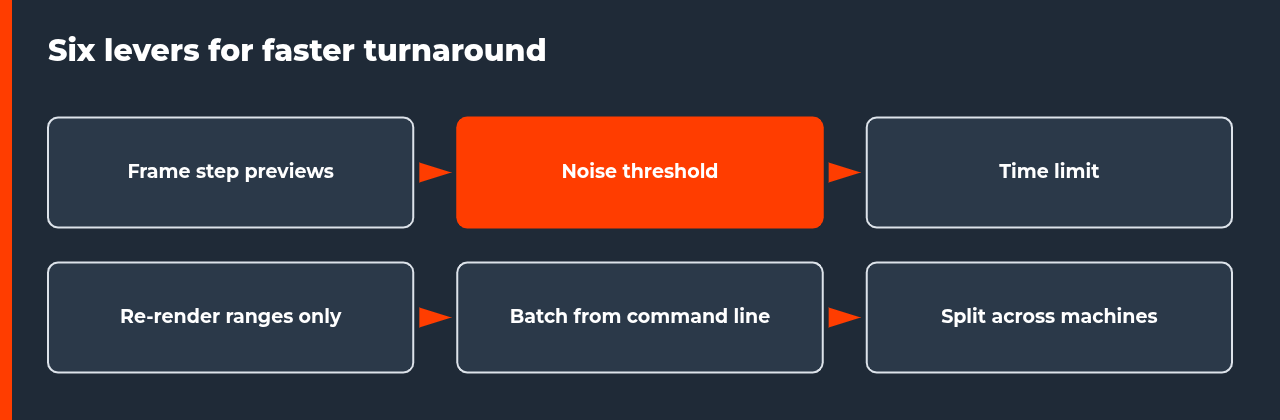
- Six documented levers shorten turnaround: frame step previews, noise threshold, time limit, re-rendering only changed ranges, command-line batches and splitting ranges across machines.
- Quote delivery dates from render hours plus a buffer, and say which milestones are previews.
- The example numbers below are illustrative and not measurements.
A client asks for a three-day turnaround and your honest answer is five. Another is happy to wait, but not through three rounds of changes. A third needs something tomorrow and you have a sequence still rendering. For a freelancer losing jobs to slow renders, none of these moments looks like a render problem. They look like a quote that was too long or a request you had to decline.
The cause sits underneath, and it can be calculated. This guide shows where render time turns into lost work, how to work out your real turnaround, and six ways to shorten it. It stays practical: no public study counts how many freelancers lose work to render time, so the numbers below are examples you can replace with your own.
Where slow renders cost a freelancer work
Render time reaches the client through three channels. Table 1 lists each one with what the client sees and the render-side cause.
| Situation | What the client sees | Render-side cause | Where to look |
|---|---|---|---|
| Long quoted turnaround | A later date than a competitor offers | Total render hours divided by daily machine hours | The turnaround math below |
| Few revision rounds | Limits on changes before delivery | Every round re-renders part of the sequence | Re-render ranges only |
| Rush requests declined | A flat no to short-notice work | The machine is already booked with the current job | The emergency render plan |

The rush case is covered in the emergency render plan for late client changes, and the wider delivery system sits in the delivery playbook for render deadlines. This guide focuses on capacity itself.
The turnaround math
Turnaround is arithmetic. Render hours are the number of frames multiplied by the minutes per frame, divided by 60. Divide that by the hours your machine can run each day to get the number of days, then add a buffer for failed frames and delivery. The longer worked version is in the deadline math guide.
Table 2 applies the formula to an illustrative job. It assumes 600 frames at three minutes per frame, two revision rounds that each re-render a quarter of the frames, and ten usable render hours per night. None of these figures is a measurement.
| Stage | Frames rendered | Render hours | Nights at 10 h |
|---|---|---|---|
| First full render | 600 | 30.0 | 3.0 |
| Revision round 1 (25% of frames) | 150 | 7.5 | 0.75 |
| Revision round 2 (25% of frames) | 150 | 7.5 | 0.75 |
| Total | 900 | 45.0 | 4.5 |
Six ways to shorten turnaround
These levers remove wasted work before they lower quality. They are described for Blender because its manual documents each one, and other 3D applications have equivalents that you can check in their own documentation.
- Preview with a frame step. In the Output properties, Step controls how many frames advance for each frame rendered, so a value above 1 skips frames. A step of 4 on the example job renders 150 frames, which is 7.5 hours instead of 30, and still shows the motion.
- Use the noise threshold. In Cycles, the Noise Threshold lets the renderer stop sampling pixels that already look clean enough. The manual says lower values mean better quality and longer renders, so test a value on a crop first.
- Set a time limit when a shot has a hard budget. Cycles can stop a render when the limit is reached, even if the sample count has not been met. Check the result, because a limit that is too low leaves visible noise.
- Render image sequences and re-render only what changed. The Blender manual does not recommend rendering directly to a video format, and a sequence lets you redo only the affected range after feedback instead of the whole shot.
- Run batches from the command line. Blender can render in the background with start and end frame arguments, which lets a job run while you work on something else.
- Split ranges across machines. The same start and end arguments let two or more machines each take part of the range. That can be a second computer you own or rented capacity.
What to tell the client
Honest quotes are a competitive advantage when the other side promises dates it cannot keep. Table 3 turns the arithmetic into wording you can adapt. These are templates, not guarantees.
| Item | How to work it out | What to tell the client |
|---|---|---|
| Final delivery date | Total hours including expected revisions, divided by daily render hours, rounded up, plus a buffer day | A date with the buffer built in |
| Preview delivery | Frame step preview hours plus export time | A motion preview earlier than the final |
| Revision limit | Hours available per round divided by hours per round | The number of rounds included in the quote |
| Rush option | Capacity left after current jobs, or extra capacity rented | A rush fee that covers the extra capacity |
Tell the client which deliveries are previews and which are finals. A preview made with a frame step or a lower resolution gives them something to approve while the final renders, which shortens the whole schedule.
When extra capacity makes sense
If you reach your limit a few times a year, buying a faster card is a large fixed cost for a seasonal problem. Renting capacity for those jobs can fit better, and the cost per frame is easy to compare with your own. There are two models: managed services that take a scene and return frames, and remote GPU servers that you run yourself. The top 10 render farms in 2026 compares how they bill. Whatever you choose, test one frame first and price the job before you promise a date.
Mistakes that keep a freelancer losing jobs to slow renders
- Quoting from the first frame instead of a sample of frames from different parts of the shot.
- Rendering straight to a video file, so a crash loses the whole shot.
- Re-rendering the full sequence after a small change instead of the affected range.
- Testing at full resolution when a frame step or a smaller preview would answer the question.
- Leaving the machine idle between jobs and quoting as if it ran only once a week.
FAQ: freelancer losing jobs to slow renders
Can slow renders really cost a freelancer jobs?
Yes, though no public study measures how often. Render time shapes three things a client sees: the delivery date you quote, how many revision rounds you can fit, and whether you can accept a rush request. If those limits make you quote longer than a competitor or turn work down, render capacity is the cause. The way to check is to calculate your turnaround honestly and see which of the three is tight.
How do I calculate my real turnaround time?
Multiply the number of frames by the minutes per frame, then divide by 60 to get render hours. Add the frames you expect to re-render after feedback, then divide the total by the hours your machine can render each day. A 600-frame job at three minutes per frame is 30 hours, which is three nights at ten hours a night. Add a buffer on top for failures and delivery.
What is the quickest way to cut render time without lowering quality?
Start by removing wasted work rather than lowering settings. Test with a frame step so you preview the motion with fewer frames, use the noise threshold so clean pixels stop sampling early, and re-render only the frame ranges a revision touches. These changes reduce hours without changing the look of the frames you deliver. Lowering resolution or samples for the final should be a last resort.
Does adaptive sampling change the final look of a render?
It can, so check it. In Cycles the noise threshold stops sampling pixels that already look clean enough, and the manual notes that lower values give better quality and longer renders. A very high threshold can leave visible noise, and the time limit stops a render when the limit is reached even if the sample count has not been met. Test both on a crop before using them on a whole sequence.
Should a freelancer buy a faster GPU or use a render farm?
It depends on how often you hit the limit. A faster GPU raises your capacity every day and you own it, but it has a purchase cost and still renders one job at a time. A render farm adds capacity only when you need it, and you pay per use. If you miss deadlines a few times a year, renting for those jobs is often easier to justify than a new card.
How should I quote delivery dates to clients?
Quote from your render hours, not from hope. Take the total hours including expected revisions, divide by the hours your machine can run each day, round up, and add a buffer day. Tell the client which milestones you will deliver as previews and which as finals. A date you can keep is worth more than a short date you will miss, because missed dates damage repeat work.
What mistakes make turnaround worse?
Rendering straight to a video file so a crash loses everything, re-rendering the whole sequence after a small change, testing at full resolution, and leaving the machine idle between jobs. Another common one is quoting from the render time of the first frame, which is often not representative. Render a few frames from different parts of the shot before you give a date.
Sources
- Blender Manual: Cycles Sampling: Noise Threshold, Max Samples, Min Samples, Time Limit and Denoise.
- Blender Manual: Frame Range: Start, End and Step.
- Blender Manual: Output Properties: output formats and image sequences.
- Blender Manual: Command Line Rendering: background rendering with frame range arguments.

COMMENTS