
How freelancers can turn extra render capacity into a client offer: what to promise, how to price it and how to protect the schedule.
Quick summary
Offering faster turnaround with a render farm works when the promise is built from measured numbers and priced from real costs. This guide shows how to turn render capacity into a client offer, what to include in the promise and how to protect the schedule.
Topic: faster turnaround with a render farm
- Quote the whole delivery chain, not only the render time
- Price from your real costs, and show speed as a separate line
- Test a frame and a short range before you promise a date
- Put assumptions and revision limits in writing
You can offer faster turnaround with a render farm if you base the promise on a measured test frame and add the steps that sit around the render: upload, download, review and a buffer. A render farm shortens one step of the delivery chain, so the pitch should describe the whole chain, not only the speed of the farm.
This guide is for freelancers and small studios that want to turn extra render capacity into a clearer offer for clients. It covers what to promise, how to price it and how to avoid the mistakes that turn a fast offer into a missed deadline. The business advice is general and based on the cost arithmetic below, not on a guarantee of results. For the wider delivery system, see our delivery playbook for animation deadlines.
What clients actually buy with faster turnaround with a render farm
Clients rarely buy render speed. They buy a date they can plan around, fewer surprises during review and the ability to ask for a change late in the week. Offering faster turnaround with a render farm is a way to make that date firmer, so the pitch should start from the client’s deadline, not from your hardware.
That also explains why faster does not always mean better. A client with a fixed launch date values a reliable delivery more than an aggressive one. Our article on how freelancers lose jobs to slow renders shows the opposite side of the same problem: the work that goes elsewhere when delivery is slow.
Build the promise from the whole chain
The render step is one part of the delivery chain. Treat each part as a measured number, not a hope. Table 1 uses a labelled example so you can see how the pieces add up. The numbers are illustrative assumptions, not measurements from your project.
| Step | Assumption in the example | Time |
|---|---|---|
| Upload the scene | Assumed; depends on connection and scene size | 1 h |
| Render on the farm | 300 frames at 87 s per frame on one 4-GPU server, from a vendor test | 7.25 h |
| Download results | Assumed | 0.5 h |
| Review and fixes | Assumed one internal pass | 2 h |
| Buffer | 20 to 30 percent of the above (rule of thumb) | About 2.5 h |
| Delivery promise | Sum of the steps | About 13 h |
The 87 seconds per frame comes from one vendor test of a 3840 by 2160 Blender Cycles animation on four RTX 5090 GPUs, reported in a video on the iRender channel. It is a single scene, so use it only as an example and measure your own. The point is the structure: in this example the render is about half of the promised time, so a faster farm alone cannot halve the promise.

If you need a way to check whether a job fits a deadline at all, the deadline math for a render gives a worked method.
What the farm costs per job
Speed has a cost, and the client is paying for it. The example uses the 4x RTX 5090 rate of $34.20 per hour at iRender’s 3-hour-plus list price, read on 13 November 2026. Rates and billing rules change, so check the current price page before you quote.
| Item | Calculation | Result |
|---|---|---|
| Render time | 300 frames × 87 s ÷ 3,600 | 7.25 h |
| Farm cost | 7.25 h × $34.20 | About $247.95 |
| Same job, 10 percent longer than tested | 7.975 h × $34.20 | About $272.75 |
The last row shows why a margin matters. If the final scene is 10 percent heavier than the test frame, both the bill and the finish time move. The vendor video below explains a cost-estimation method. It dates from January 2024, so verify its figures against the current price page.
How to price faster turnaround with a render farm
Price from your own costs, not from what the farm charges per hour. Your costs are the farm bill, the extra hours you spend managing the job, and the risk of compressing a schedule. Then add your margin. We do not suggest a rush multiplier here, because the right figure depends on your market, your client and your contract.
Most freelancers find it easier to show speed as a separate line item, such as a rush or priority fee, instead of raising the whole project price. The client then sees what faster delivery costs and can choose. It also protects you if the client later cancels the rush but keeps the scope.
| Approach | Strength | Risk |
|---|---|---|
| Separate rush line | Transparent; client can decline the rush | Client may negotiate the line down |
| Bundled project price | Simple for small jobs | Hides the cost; a heavier scene eats your margin |
Step-by-step: pitch the offer without over-promising
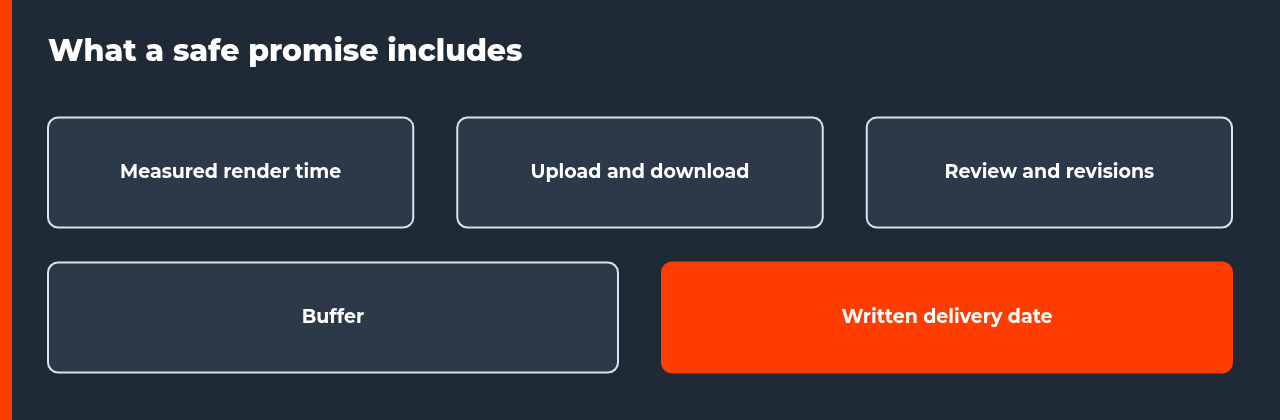
- Render one worst-case frame at final settings and record the time.
- Estimate farm render time and cost, then add upload, download, review and a buffer.
- Check that the farm supports your software, plugins and versions before you promise anything.
- Run a short test range on the farm and compare it with your estimate.
- Write the delivery date, the assumptions and the number of revision rounds into the proposal.
- Show the speed as a separate line, and agree what happens if the scope changes.
Answers to the objections you will hear
Clients ask predictable questions when they hear faster turnaround with a render farm. Prepare a short, honest answer to each one. Do not use technical detail to avoid a direct answer.
| Client question | Safe answer |
|---|---|
| Is my project safe on a farm? | Explain where the files are processed and ask the provider for its written security terms before you upload |
| Will the quality change? | Quality follows your render settings, not the farm; show a matching test frame |
| Can I request changes late? | Yes, within the agreed revision rounds, and a full re-render may extend the date |
| Why is rush more expensive? | Because the farm bill and your compressed schedule cost more |
The security question deserves a real answer. If a client has strict requirements, read the provider’s written terms and ask for a signed agreement when you need one. Do not repeat marketing claims as if they were verified facts. If you are still choosing a service, our best render farms of 2026 compares the options.
The risks of faster turnaround with a render farm
A faster offer fails in predictable ways. A slow upload eats the time you saved. A frame fails late in the run. A plugin that works locally is not supported on the farm. A client revision triggers a full re-render. Each risk has a cheap control: measure the upload, render a test range, check supported software first and limit revision rounds in writing.
Offering faster turnaround with a render farm is a reliability decision more than a speed decision. A modest date that you always hit builds more repeat work than an aggressive date that you sometimes miss. Quote from measured numbers, keep a buffer and put the assumptions in writing.
FAQ: faster turnaround with a render farm
Can a freelancer offer faster turnaround with a render farm?
Yes, if the offer is based on measured numbers. Render a test frame, estimate total render time on the farm, then add upload, download, review and a buffer. Promise the total, not the render time alone. A farm shortens the render step, but it does not remove the other steps in the delivery chain.
Should I tell the client I use a render farm?
That is a business decision, and your contract may have terms about subcontracted processing or confidentiality. If the client has security requirements, ask before you upload their scene. A good rule is to describe the benefit, a firm delivery date, and to answer any question about the pipeline honestly, including where files are processed.
How do I price a rush delivery?
Start from your real costs: the farm bill for the job, your extra hours, and the risk you take by compressing the schedule. Then add your margin. A fixed rush fee is easier to explain than an hourly pass-through, and many freelancers show it as a separate line so the client sees what speed costs.
How fast can a render farm make a job?
It depends on the scene, the machine and how well the job scales across GPUs. A vendor test reported 1m 27s per frame on four RTX 5090 GPUs for one 3840 by 2160 Blender Cycles animation. That is one scene, so your result will differ. Always measure your own test frame before you quote a date.
What can go wrong with a faster turnaround offer?
Common risks are a slow upload, a failed frame found late, a plugin the farm does not support, and a client revision that triggers a full re-render. Reduce them with a test frame, a short test range before the full run, a supported-software check and a buffer in the schedule.
Should I charge the client for the farm cost separately?
Either way can work. A separate line makes the cost transparent and protects your margin on large jobs. A bundled price is simpler for small jobs. Whichever you choose, agree on it before the work starts, and state what happens if the client changes the scope after rendering has begun.
How do I avoid over-promising a delivery date?
Quote from measured numbers, add a buffer of 20 to 30 percent as a rule of thumb, and state the assumptions in writing, such as the approved scene and the number of revision rounds. Promise a date range for revisions, not a single fixed time, unless you control every step.
Sources
- iRender, pricing page, read 13 November 2026 (vendor list prices)
- iRender YouTube channel, 4x RTX 5090 vs 4x RTX 4090 Blender render farm benchmark, checked 13 November 2026 (vendor content; one test scene)
- iRender YouTube channel, Cost Estimation on iRender Farm, January 2024 (vendor content)

COMMENTS