
What happens when you forgot to shut down cloud server time on an hourly render service, what it can cost, and how to prevent it.
Quick summary
When you forgot to shut down cloud server time on an hourly render service, the meter keeps running until Shutdown, so every idle hour is billed at the full rate. This guide shows the documented billing rules, example costs and a checklist to prevent it.
Topic: forgot to shut down cloud server
- Billing on remote-machine services follows server time, not render activity
- Example: one RTX 5090 server left on for 12 hours adds about $116.64 at the 3h+ list rate
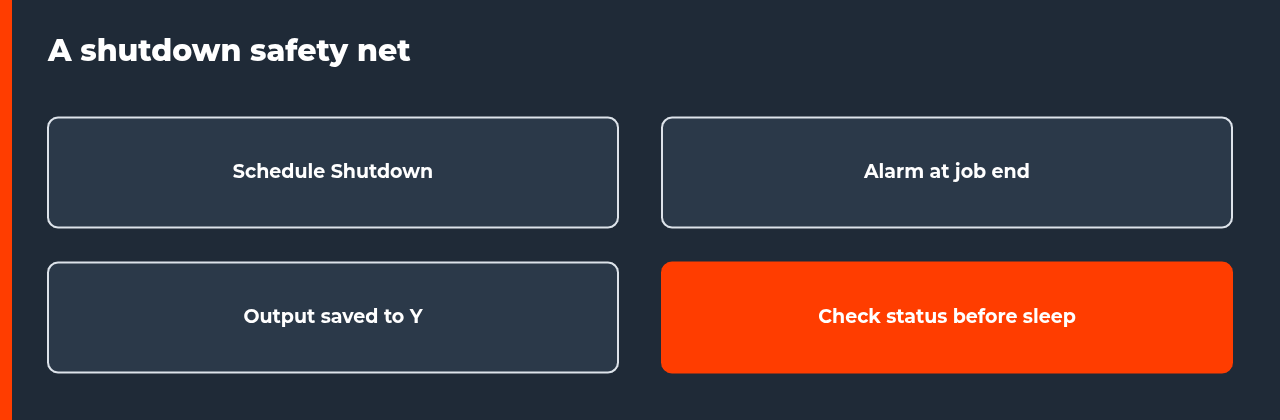
- Schedule Shutdown, an alarm and a status check make a three-layer safety net
- Closing the remote desktop window is not documented as a shutdown
If you forgot to shut down cloud server time on a service that bills by the hour, you pay for every hour the machine stays on, rendering or not. On iRender’s list prices read on 13 November 2026, one RTX 5090 server left running for 12 hours would add about $116.64 at the 3-hour-plus rate. Most of that cost is avoidable with a scheduled shutdown and a short routine.
This guide is for artists who rent a remote Windows machine to render, which is the IaaS model. It uses iRender as the worked example because its documentation and price page are public, and it labels those sources as vendor content. For the broader workflow, see our guide on how to use a render farm for animation.
What happens when you forgot to shut down cloud server time
A remote-machine service gives you a full computer in a data center. You connect, install or use your software, render, and then shut the machine down. The provider cannot know whether an idle machine is deliberately waiting for you or simply forgotten, so billing follows the time the machine is on. That is the core of the forgot to shut down cloud server problem: the cost is driven by your habits, not by the size of your scene.
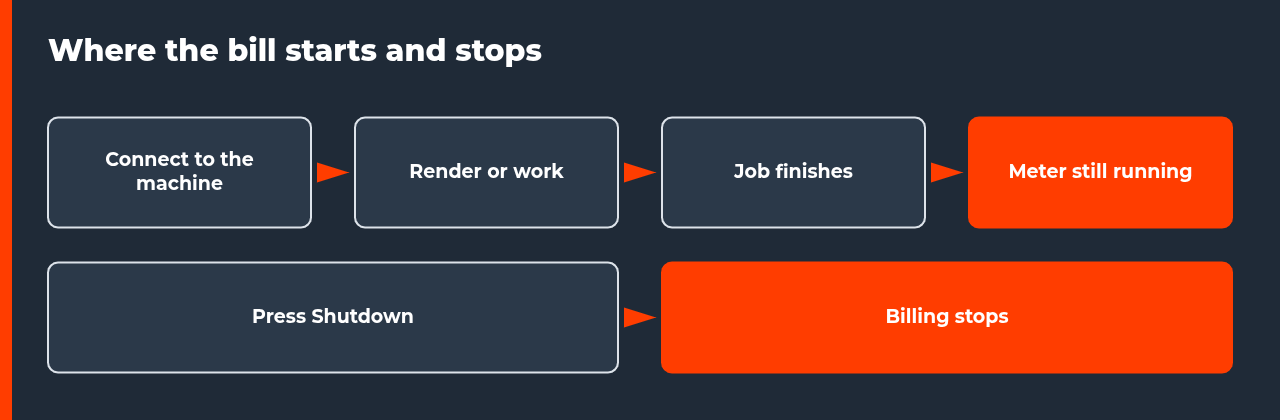
iRender’s Quick Start describes billing as starting when you connect and stopping when you press the red Shutdown button. Its pricing documentation measures usage in node-hours, one server running for one hour, and reports the charge after shutdown as points deducted. The price page adds that one-GPU servers have a one-hour minimum and then bill per minute, while other servers bill per minute from the first minute.
| Item | What the documentation says | Why it matters |
|---|---|---|
| Billing starts | At connect, per the Quick Start | Setup and upload time on the machine is billed |
| Billing stops | At Shutdown, per the Quick Start | Closing the window is not described as a stop |
| Unit | Node-hours, charged per minute after the first hour on one-GPU servers | Short idle periods still add up |
| Report | Points deducted are shown after shutdown | You see the final figure only after the session ends |
| Not stated | What happens when the balance runs out | Do not rely on the balance as a safety net |
These are vendor statements read on the dates in the Sources section. Check the current documentation before you rely on them, because billing rules can change.
How much a forgotten server can cost
The table below turns list prices into example costs. It uses the 3-hour-plus rates from iRender’s price page read on 13 November 2026: $9.72 per hour for one RTX 5090 server and $34.20 per hour for a four-GPU RTX 5090 server. It assumes the rate applies for the whole idle period. These are calculations for illustration, not invoices.
| Idle time | 1x RTX 5090 at $9.72/h | 4x RTX 5090 at $34.20/h |
|---|---|---|
| 1 hour | $9.72 | $34.20 |
| 8 hours (one night) | $77.76 | $273.60 |
| 12 hours | $116.64 | $410.40 |
| 24 hours | $233.28 | $820.80 |
| 72 hours (a long weekend) | $699.84 | $2,462.40 |
The vendor also publishes a video on estimating cost. It is vendor content and it dates from January 2024, so verify its figures against the current price page before you use them.
Why people forgot to shut down cloud server sessions
Forgotten sessions follow a few predictable patterns. We have not measured how often each happens, so treat the list as common situations, not statistics. In every case the machine is on and nobody is watching it.
| Situation | Why the meter keeps running | Prevention |
|---|---|---|
| The render finishes overnight | Nobody is awake to press Shutdown | Set Schedule Shutdown before leaving |
| You close the remote window | The window is not the Shutdown button | Use Shutdown, then confirm status |
| You wait for a download | The machine stays on during transfers | Move results to the output drive first, then shut down |
| You test a setting and walk away | A short test turns into a long idle gap | Set an alarm when the test starts |
| You run several machines | One of them is easy to miss | Check the full machine list daily |
| The connection drops | The machine may keep running without you | Reconnect and shut down, or use the scheduler |
The common thread is that nothing on your own computer reminds you that a rented machine is still running. The fix is to create the reminder yourself.
Which shutdown option does what
iRender’s documentation describes several controls that look similar. Only some of them end the session. Table 4 compares them using what the documentation states, and it marks what the documentation leaves unsaid.
| Control | What it does (per documentation) | Stops the session? |
|---|---|---|
| Shutdown button | Turns the server off; billing is reported after shutdown | Yes, per the Quick Start |
| Schedule Shutdown | Turns the server off at a time you set; a red box shows the time remaining | Yes, at the set time |
| Disconnect internet | Cuts the server’s internet access in 1 to 3 minutes; the page does not mention billing | Not described as a stop |
| Closing the remote desktop window | Ends your viewing session only; the documentation does not describe it as a shutdown | Do not assume so |
The Disconnect internet feature exists for security and network control, so do not use it as a cost control. If the documentation does not say that an action stops billing, assume it does not.
Step-by-step: build a shutdown safety net
This routine takes about five minutes to set up and removes most of the risk of a forgot to shut down cloud server bill. Do it for every long job, not only the important ones.
- Measure one test frame and estimate the total render time, then add a margin of 20 to 30 percent (our rule of thumb, not a vendor figure).
- Set the render output path on the C drive and save frames as an image sequence, so finished frames survive an interruption.
- Open the machine screen, choose Scheduler, turn on Activate the timer, set the shutdown time after your estimated finish plus the margin, and choose SAVE SETTINGS.
- Check that the red box with the remaining time appears in the top-left corner of the machine screen.
- Set a phone alarm for the expected finish time so you can move the results to the output drive and shut down manually if the job ends early.
- Before you sleep or leave, look at the machine list and confirm which machines are still running.
Can a scheduled shutdown cut the render short?
It can. The Schedule Shutdown page says how to set the timer, but it does not say whether unsaved work or render output is preserved when the timer fires, and it does not explain billing effects. Without that information, assume that anything not yet written to disk may be lost.
There are two practical answers. First, choose the time from a measured test frame with a margin, not from a guess. Second, write each finished frame to disk as it completes, which is why an image sequence is safer than rendering straight to a video file for long jobs. If you cannot estimate the finish time, a manual shutdown guarded by an alarm is safer than a timer set too early.
What shutdown does to your files
Shutting down does not mean starting from scratch next time. iRender’s FAQ states that your system machine is saved after each working session, and that software and applications on the drive are kept. The risk is not the shutdown. It is the location of your results.
The FAQ advises setting the render output path on the C drive, because the Z drive is a network drive used for file transfer and a lost connection can interrupt writing to it. Our reading of the drive documentation is that you should render to C, then zip the results and move them to the output drive before you shut down. Check the current drive documentation before you rely on this routine, because limits and layouts can change.
Does a managed render farm have this problem?
Much less, because the service model is different. On a managed farm you upload a project and submit a job, and the service schedules and bills the rendering. There is no remote machine of yours waiting for a shutdown click, so a forgotten session is not the main risk there. The trade-off is less control over the software environment, which is why some artists still prefer a remote machine.
Our guide on IaaS versus SaaS render farms explains the differences in detail. If you are still choosing a service, the best render farms of 2026 compares several options, and you should weigh the idle-cost risk against the control each model gives you.
A short checklist for every session
The next time you connect, run through this before you leave the keyboard. Every item takes under a minute.
- Is the render output on C, with finished frames saved to disk?
- Is a Schedule Shutdown set, with a margin, and is the red timer box visible?
- Is there a phone alarm for the expected finish?
- Have you written down the hourly rate of the machine you booked?
- Will you check the machine list before you sleep?
A single missed shutdown rarely ruins a project, but a habit of missing them does. The cost of a forgot to shut down cloud server mistake is the idle hours times the hourly rate, so the best protection is to make idle hours short and visible.
FAQ: forgot to shut down cloud server
What happens if I forgot to shut down cloud server time on a render service?
On a service billed by server time, the meter keeps running until the server is shut down, whether or not anything is rendering. The cost is the hourly rate multiplied by every idle hour. iRender’s documentation reports the charge after shutdown as points deducted. If you forgot to shut down cloud server time overnight, check your balance and usage history before you start the next session.
Does closing the remote desktop window stop billing?
The documentation we read names the Shutdown button as the point where billing stops, and it does not describe closing the remote desktop window as a stop. Treat closing the window as leaving the machine running. Use Shutdown, or set a scheduled shutdown, and confirm in the machine list that the status has changed before you walk away.
How do I stop forgetting to shut down a cloud render server?
Combine three habits: set a Schedule Shutdown before you leave, set a phone alarm for the expected finish time, and check the machine list before you go to sleep. One safeguard can fail, but three rarely fail together. Our six-step checklist above turns this into a routine you can repeat for every job.
Can a scheduled shutdown cut my render short?
Yes, if the timer fires before the render ends. The Schedule Shutdown page does not say whether unsaved work is preserved, so do not assume it is. Set the time with a safety margin based on a measured test frame, save frames as an image sequence so finished frames survive, and run a short test with the scheduler before you rely on it for a long job.
Will I lose my software or files when I shut the server down?
iRender’s FAQ says your system machine is saved after each working session, including installed software. The real risk is where output goes. The FAQ advises setting the render output path on the C drive, not the network Z drive, because a connection loss can interrupt writing. Move finished results to the output drive and download them before you shut down.
Does a managed render farm have the same idle-cost problem?
Much less. On managed farms you submit a job and the service schedules it, so there is no server of yours waiting for a shutdown click. Billing models differ by farm, so read each one. Our IaaS versus SaaS guide explains how the two service models differ, and why the forgotten-server risk belongs mainly to remote-machine services.
How much can a forgotten server cost?
It depends on the server and the hours. At iRender’s 3-hour-plus list rate read on 13 November 2026, one RTX 5090 server left on for 12 hours would add about $116.64, and a four-GPU RTX 5090 server left on for 12 hours about $410.40. These are illustrative calculations from list prices, not invoices, and your rate may differ.
Sources
- iRender documentation, Schedule Shutdown, read 16 November 2026 (vendor documentation)
- iRender documentation, FAQ, read 16 November 2026 (vendor documentation)
- iRender documentation, Disconnect internet, read 16 November 2026 (vendor documentation)
- iRender documentation, iRender pricing, read 16 November 2026 (vendor documentation)
- iRender documentation, Quick Start, read 10 November 2026 (vendor documentation)
- iRender, pricing page, read 13 November 2026 (vendor list prices)

COMMENTS