
Overnight rendering uses less electricity than most people expect. Here is the render farm vs electricity cost math, with the assumptions shown and the costs that a power bill leaves out.
Key points
The render farm vs electricity cost question is easier than it looks: one overnight job on a machine you own costs a small amount of electricity, and a rented GPU server costs far more per hour. What a farm sells is elapsed time, not kilowatt-hours.
FOCUS: RENDER FARM VS ELECTRICITY COST
- Electricity cost is watts divided by 1000, times hours, times your price per kWh. Measure the wall draw instead of using the card rating.
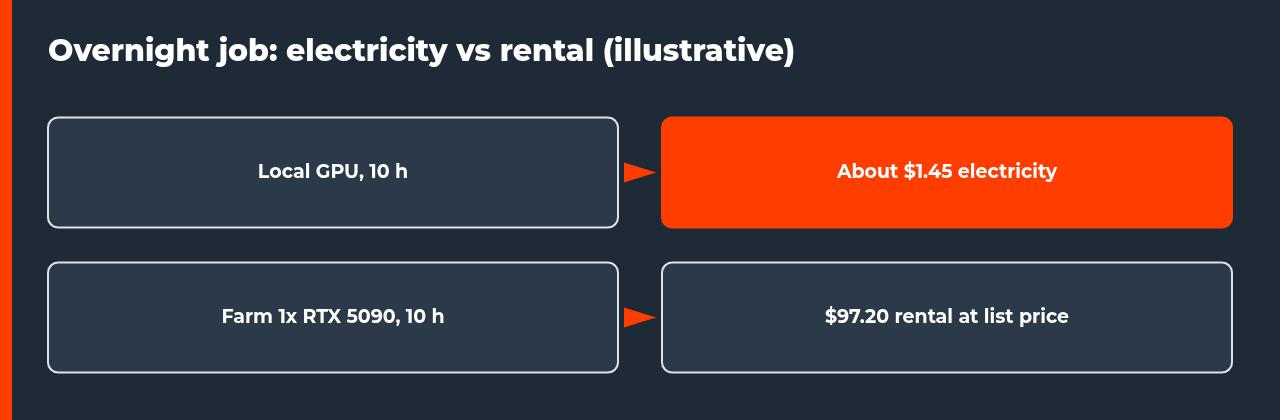
- An illustrative 800 W workstation rendering for 10 hours uses 8 kWh, about $1.45 at the US residential average of 18.16 cents per kWh.
- At list price, ten hours on one rented RTX 5090 server comes to $97.20, so electricity alone is not a reason to rent.
- The case for a farm rests on time saved, deadlines, and keeping your own machine free.
- Electricity leaves out hardware cost, heat, noise and waiting time.
People who render overnight often notice the power bill before they notice the render. It is a fair worry, so this render farm vs electricity cost comparison puts numbers on it, shows the assumptions, and then looks at the costs a power bill never shows. Where a figure is an example, it is labelled as one.
The short answer
For a single overnight job on hardware you already own, electricity is a small cost. Renting a GPU server for the same number of hours costs much more. The decision about a render farm usually turns on how long the job takes, how many jobs overlap, and what your own machine could be doing instead. If you want the wider cost picture first, start with the animation rendering cost guide.
How to calculate the electricity cost of an overnight render
- Find the wall draw. Use a plug-in power meter that shows watts and kWh. Read the value after the GPU load has settled, and use the whole system, not just the graphics card.
- Convert to kWh. Divide watts by 1000 and multiply by the hours rendered. An 800 W draw for 10 hours is 0.8 kW times 10 hours, which is 8 kWh.
- Apply your tariff. Take the price per kWh from your own bill. The U.S. Energy Information Administration reports an average residential price of 18.16 cents per kWh for August 2026 (preliminary), which is a useful national reference and not your local rate.
- Add cooling only if you can measure it. Air conditioning or extra fans change the total, but guessing a number is worse than leaving it out and saying so.
A worked example with the assumptions shown
Assume a workstation that draws 800 W at the wall while rendering, for 10 hours overnight. That assumption is illustrative; your meter will give the real figure. The energy is 8 kWh. Table 1 shows the electricity side of the render farm vs electricity cost comparison at different tariffs, including the EIA national average.
| Price per kWh | One night (8 kWh) | 20 nights (160 kWh) | Note |
|---|---|---|---|
| 10 cents | $0.80 | $16.00 | Low tariff, example only |
| 18.16 cents | $1.45 | $29.06 | US residential average, EIA, August 2026 (preliminary) |
| 30 cents | $2.40 | $48.00 | Higher tariff, example only |
| 45 cents | $3.60 | $72.00 | High tariff, example only |
What a render farm bills instead
iRender is a useful example of the remote GPU server model, where you rent a Windows or Linux server, install your software and run the render yourself, so it is not the same as a managed SaaS farm that takes a scene and returns frames. iRender states on its price page, as read on 13 November 2026, that one RTX 5090 server (3i) costs $10.80 per node hour, or $9.72 for sessions of three hours or more, and that a four-GPU RTX 5090 server (5i) costs $38 per node hour, or $34.20 for sessions of three hours or more.
Servers with one GPU have a one-hour minimum, then billing is per minute. This site has not tested these servers, and list prices change, so treat the figures as a snapshot.
Table 2 compares one overnight job in three ways. The farm rows use list prices, the local row uses the 800 W example above, and the four-GPU row assumes perfect scaling, which real scenes rarely reach.
| Option | Elapsed time | Cost | What you gain or give up |
|---|---|---|---|
| Local GPU overnight | 10 h | About $1.45 electricity, hardware not included | Machine busy, heat and noise in the room |
| Farm, 1x RTX 5090 (3i) | 10 h at similar speed | $97.20 at the three-hour rate | Your machine is free, no time saved |
| Farm, 4x RTX 5090 (5i) | About 2.5 h if scaling were perfect | $95.00 at the standard rate | Finishes about 7.5 h sooner if the scene scales |
The numbers in this render farm vs electricity cost comparison make the point plainly. Electricity is the cheapest line in the table, and a farm costs roughly sixty-five times more for the same job at these list prices. Anyone who buys cloud time to save on the power bill is solving the wrong problem. The case for renting is the last column: hours saved and a machine you can keep working on. Because billing continues until you press Shutdown, an idle rented server also keeps costing money, which cloud rendering idle cost covers in detail.
What the electricity number leaves out
A power bill measures one side of the render farm vs electricity cost question. The local option carries others that do not appear on it, and a fair comparison needs a rough price for each. Table 3 lists them with a way to put a number on each.
| Cost | Why it matters | How to price it |
|---|---|---|
| Hardware purchase and wear | The GPU is paid for whether it renders or not, and heavy use shortens its useful life | Purchase price minus expected resale, divided by months of use |
| Machine unavailable | You cannot model or animate on a workstation that is rendering at full load | Hours blocked times the value of an hour of your work |
| Heat and noise | Sustained load heats the room and can push the card into throttling | Compare against your cooling cost; see the thermal throttling guide |
| Waiting time | A slow job can miss a delivery slot | Cost of a late delivery or rush fee |
The first row is the one people skip. A high-end card costs money even on days it never renders, and the hidden costs of rendering locally guide walks through that side of the ledger. If sustained load is the problem, the thermal throttling guide covers the heat side.
When electricity decides the render farm vs electricity cost question
There are cases where the render farm vs electricity cost comparison tips toward the power bill. A render node that runs around the clock for weeks uses far more than one overnight job. Several machines rendering together multiply the draw. A very high tariff, or time-of-use pricing that makes night power expensive, raises the figure again. In these cases measure the real draw and recalculate, because the example in this guide will not match your setup.
Mistakes that skew a render farm vs electricity cost comparison
- Using the card rating as the whole-system draw, which overstates or understates the real wall power.
- Comparing a three-hour discounted rental rate with a session that will not reach three hours.
- Assuming perfect scaling across several GPUs. Test one frame first.
- Leaving a rented server running after the render finishes, because billing stops only at Shutdown.
- Ignoring hardware cost and your own blocked time, which makes the local option look free.
A practical way to decide
Render one frame locally, record the time and the wall draw, and work out the cost per frame. Then price the same frame on a farm, using its current price page and a short test, and compare cost per frame and total elapsed time against your deadline. If you decide to compare services, the top 10 render farms in 2026 lists how they bill. The render farm vs electricity cost question then answers itself with your own numbers.
FAQ: render farm vs electricity cost
How much does overnight rendering cost in electricity?
It depends on the wall power of your machine and your tariff. An illustrative workstation drawing 800 W for 10 hours uses 8 kWh. At the US residential average of 18.16 cents per kWh (EIA, August 2026, preliminary) that is about $1.45 per night, or roughly $29 for 20 nights. Your own figure can be lower or higher, so measure the real draw with a plug-in power meter and read your tariff from your bill.
Is a render farm cheaper than electricity?
Not for the same number of GPU hours on a single card. Electricity for one overnight job is usually a small number, while renting a GPU server costs far more per hour. The comparison changes when you count elapsed time: several GPUs working in parallel can finish a job in hours instead of a night, and that time saving is what you pay for, not the kilowatt-hours.
How do I measure my render machine’s real power draw?
Plug the workstation into a power meter that shows watts and kWh, start a render, and read the figure after the GPU load has settled. Run it for at least ten minutes and note the peak and the steady value. Do not use the graphics card’s rated power as the whole-system number. The card is only one part of the machine, and CPU, drives and fans add to the wall reading.
Does the RTX 5090’s 575 W figure mean my PC draws 575 W?
No. NVIDIA lists 575 W as the total graphics power of the card and recommends a system power supply rating for sizing, with an 850 W minimum listed on the product page. Those figures help you choose a power supply. They are not a measurement of what your whole machine pulls from the wall during a render, which depends on the scene, the render engine and the rest of the system.
How does iRender bill a render session?
iRender states that its servers are billed per node hour, with a lower rate for sessions of three hours or more, and that servers with one GPU have a one-hour minimum before per-minute billing. Its documentation says billing starts when you connect and stops only when you press Shutdown. The site has not tested these servers, and list prices can change, so check the current price page before you plan a job.
What costs does an electricity-only comparison miss?
It leaves out the purchase and wear of the hardware, the time your own machine is unavailable for other work, heat and noise in the room, and the value of finishing sooner. It also ignores the way a deadline changes the math: a slow overnight render that misses a delivery slot can cost more than a rental. Price each item for your own situation instead of copying anyone else’s numbers.
When does a render farm make financial sense?
It makes sense when waiting is the expensive part: a tight deadline, a long sequence that would tie up your only machine for days, or a peak week when local capacity is not enough. It makes less sense for a single overnight job on a machine you already own, where electricity is small. Test one frame on both options first and compare the cost per frame.
Sources
- U.S. Energy Information Administration, Electric Power Monthly, Table 5.3: average residential price, 18.16 cents per kWh for August 2026 (preliminary) as read on 13 November 2026.
- NVIDIA GeForce RTX 5090 product page: 575 W total graphics power, 32 GB GDDR7, power supply guidance.
- iRender price page: GPU server list prices per node hour as read on 13 November 2026 (vendor figures, not tested by this site).
- iRender documentation, Quick Start: billing starts at connection and stops at Shutdown (vendor documentation).
- Cost Estimation on iRender Farm (iRender YouTube channel, January 2024): vendor video on estimating render cost.

COMMENTS