
What to do when your computer died before render deadline: a seven-step recovery plan covering frames, scene recovery and a replacement machine.
Quick answer
If your computer died before render deadline, do not rush. Count the frames already rendered, recover the scene file, get a replacement machine with matching software, test one frame against an old one and render only the missing range.
COMPUTER DIED BEFORE RENDER DEADLINE | FINISHED FRAMES | SCENE RECOVERY | REPLACEMENT MACHINE | MISSING RANGE
- Assess first: know what survived before you choose a plan.
- Finished frames are safe: an image sequence keeps every completed frame.
- Recover the scene: Blender can restore the last session or auto save.
- Match the setup: same versions, plugins and licences on the new machine.
- Render the gap only: restart from the missing frame, not frame one.
The worst version of a bad day: the machine that was rendering your delivery goes black twelve hours before the deadline. If your computer died before render deadline, panic costs more than the hardware. This guide gives you a recovery order so each hour goes to the right job.
It belongs to the cluster around local vs cloud rendering for animators. To prepare before a failure, read the plan for moving rendering off one machine, and the companion guide on a render backup plan.
What to do in the first hour when your computer died before render deadline
When your computer died before render deadline, start with information, not action. Can the machine start at all? If not, can you remove its drive and read it elsewhere? What does your output folder contain? If you rendered an image sequence, every finished frame is an ordinary file, and the question becomes how many frames are missing. The Blender manual advises against rendering directly to a video format because a problem mid-render can leave the file unplayable, and says that image output lets you restart from the failed frame.
| What you find | What it means | Next step |
|---|---|---|
| Image sequence in output folder | Finished frames are safe | Render only the missing range |
| Video file only | File may be unplayable | Plan a full re-render and encode after |
| Scene file intact | You can reopen the project | Match versions on a new machine |
| Scene file damaged | Recent work may be lost | Use recovery options below |
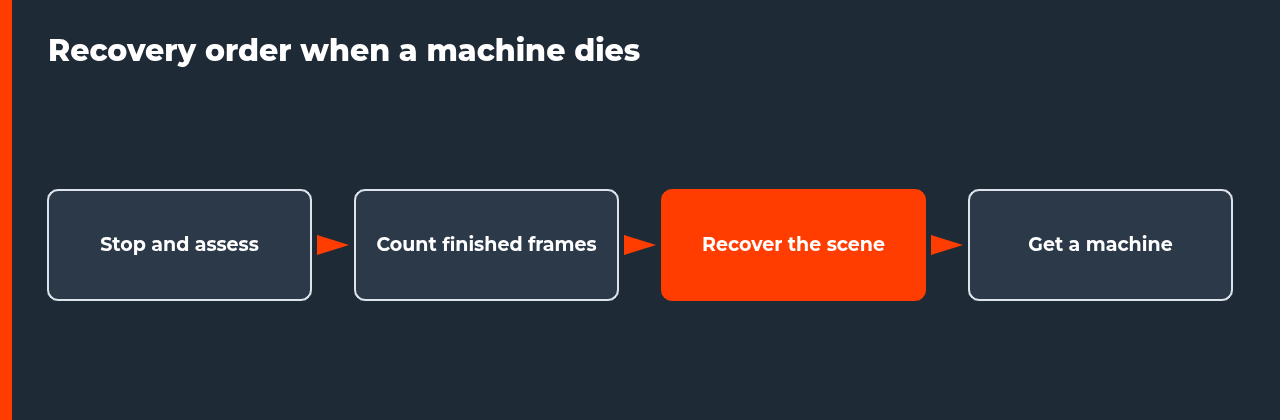
Seven steps to finish the job
- Stop and assess. Check whether the machine or at least its drive can be read.
- Count finished frames. Open the output folder and list the first and last frame that exist, and any gaps.
- Recover the scene. In Blender, use File, Recover, Last Session or Auto Save. Other applications have their own recovery or backup files.
- Get a replacement machine. A colleague’s computer, a spare, a rented remote machine or a render farm.
- Match the setup. Install the same software, plugin and engine versions, and bring the scene, assets and caches.
- Test against an old frame. Render a frame you already have and compare. If it matches, the setup is right.
- Render the missing range. Start from the first missing frame and check progress regularly.
Recovering a Blender scene
The Blender manual lists two recovery routes. Under File, Recover, Last Session, Blender loads the file it saves automatically just before it exits. Under File, Recover, Auto Save, it restores the most recent automatic save, which helps after a crash or an exit without saving. The manual adds that only one auto-saved file is kept per project, that auto save does not store changes made in sculpt, texture paint or edit mode, and that changes after the last save are lost. See the Open and Save page.
If your computer will not start, the auto-saved file lives in the system temporary directory on that machine, which means you may need to read the drive from another computer. Other applications use different recovery files, so check your software’s documentation now, before you need it.
| Route | What it restores | Limit |
|---|---|---|
| Last Session | File saved just before exit | Only if Blender exited normally enough to save it |
| Auto Save | Most recent automatic save | One file per project |
| Normal saved file | Your last manual save | Changes since then are lost |
Tell the client early
While you recover, protect the relationship. If the delivery is at risk, say so early, with a plan. A good message states what happened in one sentence, how many frames are finished, how many remain, what you are doing to finish and when you expect to deliver. Clients usually cope with a clear, honest delay far better than with silence followed by a missed deadline.
If the shot allows it, offer a partial delivery: the finished frames, a preview of the rest or the shot in lower resolution first. A partial delivery buys time and shows progress. Do not promise a time you cannot meet. It is better to give a realistic estimate that includes setup and a test frame, and then beat it.
A computer died before render deadline is a time problem more than a hardware problem, so do not let the crisis hide the cheap wins. If a colleague has a matching machine sitting idle, ask for it now, before you spend an hour on setup elsewhere. If your files were synced or copied anywhere, find the latest copy first. Small decisions made in the first hour decide how many frames you can still render before the deadline, so spend a few minutes choosing the plan instead of acting on the first idea.
Keep a short log while you recover
After a computer died before render deadline, write down each step as you take it: what you checked, what you changed, which frames you rendered and when. In a stressful hour it is easy to repeat a step or skip a check, and a log prevents both. It also becomes the start of your render backup plan, because every gap you hit during the recovery tells you what to prepare before the next failure.
Choose the replacement machine
The right replacement is the one you can have running soonest with matching software. A colleague’s computer is fast if it has your versions. A rented remote machine takes setup time but gives you full control of software. A render farm saves setup if it supports your software and plugins, but you must check that first. Whichever you choose, render a frame you already have and compare it before you send the whole range.
| Option | Speed to start | Main check |
|---|---|---|
| Colleague or spare machine | Fast if software matches | Versions and licences |
| Rented remote machine | Needs setup time | You install everything |
| Render farm | Quick if supported | Plugin and version support |
For help deciding between owning more hardware and renting capacity, see the break-even model in the local vs cloud rendering guide.
FAQ: computer died before render deadline
What should I do first when my computer died before render deadline?
Stop and assess before you act. Find out whether the machine can start at all, and check what frames already exist in your output folder. If you rendered an image sequence, finished frames are safe files, and only the missing range needs rendering. That one check often shrinks the problem from the whole shot to a few hours of work.
Can I recover my Blender scene after a crash?
Often, yes. The Blender manual describes File, Recover, Last Session, which loads the file Blender saves just before it exits, and File, Recover, Auto Save, which restores the most recent automatic save. It also says only one auto-saved file is kept per project, and that changes made after the last save are lost.
Do I need to render the whole animation again?
Not if you rendered an image sequence. The Blender manual notes that image output lets you restart from the failed frame, and advises against rendering straight to video because a mid-render problem can leave the file unplayable. Render only the missing frame range and keep the frames you already have.
Where can I render if my machine is dead?
Options include a colleague’s machine, a spare computer, a rented remote machine or a render farm. Each needs the same software version, plugins and licences as your original setup, plus your scene and assets. Pick the option you can set up fastest, and test a frame before you send the full range.
How do I match my old setup on a new machine?
Use your notes. Write down the software and plugin versions, the render engine version, the scene file path and the output settings. Install the same versions, open the scene and render a frame you already have. If the new frame matches the old one, the setup is correct.
Should I ask for a deadline extension?
If recovery will take longer than the time you have, yes, and ask early. Give a clear status: frames finished, frames remaining, how you will finish and when. Clients tend to respond better to a specific plan and a realistic time than to a late surprise. Offer a partial delivery if the shot allows it.
How do I avoid this next time?
Prepare before it happens. Render to image sequences, keep versions of the scene in more than one place, record your software versions and know in advance where you would render if your machine failed. The companion guide on a render backup plan covers a full checklist.

COMMENTS