
Quiet rendering options for animators: why long renders get loud and six practical ways to cut fan noise and heat at home.
Quick answer
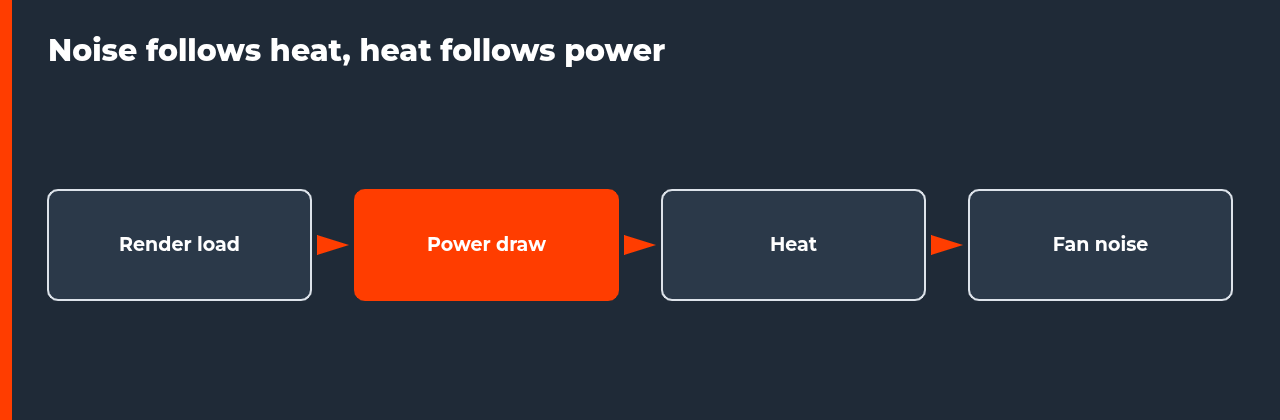
Quiet rendering options all cut the same chain: render load becomes power draw, power becomes heat and heat becomes fan noise. Lower the power, reduce the load, change when and where the render runs, or move the render off the machine in your room.
QUIET RENDERING OPTIONS | GPU POWER LIMIT | THREAD LIMIT | AIRFLOW | RENDER ELSEWHERE
- Follow the chain: load makes power, power makes heat, heat makes noise.
- Lower the power limit: documented to reduce power use and heat.
- Limit threads: less CPU load, longer render.
- Change place and time: render when you are out or in another room.
- Test one frame: measure time, temperature and noise before a full run.
A render that runs for twelve hours is a twelve-hour fan noise problem. If your workstation sits in the room where you work or sleep, you will look for quiet rendering options sooner or later. The good news is that noise follows a simple chain, and you can break it at several points.
This guide lists six ways to cut fan noise, shows how to test them and explains when moving the render elsewhere is the better answer. It belongs to the cluster around local vs cloud rendering for animators. If renders also make the computer unusable, see how to use your computer while rendering.
Why renders are loud: the chain from load to noise
A render keeps hardware near full load for a long time. Full load draws power, and almost all that power ends up as heat. The cooling system answers by spinning its fans faster. NVIDIA lists the GeForce RTX 5090 with a total graphics power of 575 W, which gives a sense of the heat a single high-end card can produce at full load. To be quiet, you reduce load, reduce power or move the heat and the sound somewhere else.
| Point in the chain | What you can change | Trade-off |
|---|---|---|
| Load | Fewer threads, fewer devices, smaller jobs | Longer render |
| Power | GPU power limit | Possible speed loss, not documented, test it |
| Heat | Airflow, vents, room temperature | Costs little |
| Noise | Location, enclosure, timing | Depends on your room |
The chain is general reasoning about computer hardware. The power-limit row rests on the documentation cited below, which says lowering limits can reduce power use and heat and does not describe performance or noise effects, so those you must measure.
Six quiet rendering options
- Lower the GPU power limit. GPU server documentation describes setting a limit per GPU with nvidia-smi, within the card’s minimum and maximum limits, and says lower limits can reduce power use and heat.
- Limit render threads. On CPU renders, fewer threads mean less load and less heat, at the cost of render time.
- Render when you are out. Queue the job when you leave, so the noise happens when nobody is in the room.
- Move the machine. A separate room, a ventilated cabinet or a longer cable between the machine and your desk moves the noise away from you. Keep airflow open.
- Improve airflow. Clean dust, clear vents and keep the case in a cool spot, so fans need less speed to cool the same load.
- Render elsewhere. A separate machine or rented capacity removes the noise from your room entirely.
Setting a GPU power limit safely
The Lambda GPU power limit guide shows the nvidia-smi commands for checking limits, setting a limit for each GPU and confirming the value. It says the limit must lie between the GPU’s minimum and maximum power limits, and in its example the range is 150 W to 530 W with a default of 480 W. It also says the setting does not persist after a reboot unless you run a script at boot, and its steps use administrator rights.
That page covers server GPUs on Linux, so check what applies to your operating system and card before you change anything. It does not state how much speed you lose or how much quieter the fans become. Run a short test render at the default limit and at a lower one, record time, temperature and noise, and decide from your own results.
| Test | Record | Decision |
|---|---|---|
| Render one frame at the default limit | Time, temperature, noise | Baseline |
| Render the same frame at a lower limit | Time, temperature, noise | Accept if time cost is small |
| Render ten frames in a row | Does temperature settle | Use the lowest comfortable limit |
Timing, placement and airflow
The cheapest quiet rendering options cost nothing. Render when you are out. Keep the machine where its sound does not reach you, with open airflow around it. Clear dust from filters and fans, because a clogged machine runs hotter and louder at the same load. These steps do not change the speed of the render at all.
| Option | Cost | Effect on render speed |
|---|---|---|
| Render when out | None | None |
| Move the machine | Cable or desk change | None |
| Clean dust | Time | None, may improve cooling |
| Thread limit | None | Longer render |
What quiet cannot do
Quiet rendering options reduce noise, but they do not remove it. A machine at full load will always make some sound, and a lower power limit or thread cap only changes how much. If you need a silent room, the only complete answer is to put the render somewhere else. Be honest about which problem you have: noise that is merely annoying can be tamed, while noise that stops you working or sleeping needs distance.
Also remember that quieter usually means slower. If your deadline is tight, a render that takes longer to be quiet may cost more than the noise did. Measure the time cost on a test frame, compare it with your deadline and decide whether the trade is worth it for this project or only for projects with slack.
When to render elsewhere
If you need silence while you work and renders are long, moving them off the machine may be the better answer. Compare your own hours and your tolerance for noise with rental cost, using the break-even model in the local vs cloud rendering pillar. If you decide to move, the migration plan keeps a fallback while you test.
FAQ: quiet rendering options
Why does my computer get so loud when I render?
A render keeps the processor or graphics card near full load for hours. Full load produces heat, and the cooling system raises fan speed to remove it. That is normal behaviour, not a fault. The longer and heavier the render, the longer the fans run fast, which is why renders are louder than most other work.
Does lowering the GPU power limit reduce noise?
A lower power limit reduces power use and heat, according to GPU server documentation that describes setting limits with nvidia-smi. Less heat usually means the fans need to spin less, though that page does not state a noise effect or a performance effect. Test a short render at a lower limit and compare time, temperature and noise on your own machine.
How do I set a GPU power limit?
On systems where nvidia-smi can set it, the documentation shows nvidia-smi with the power limit option for each GPU, and the value must lie between the card’s minimum and maximum limits. The page notes the setting does not persist by itself after a reboot and uses administrator rights. Read the documentation for your system before changing anything.
Will limiting threads make a CPU render quieter?
Often, yes. Fewer threads mean less total load, so less heat and lower fan speed, at the cost of a longer render. Test a short frame range at several thread counts and pick the setting that gives acceptable speed and noise. Thread options are available on the command line of many renderers.
Can I just render somewhere else?
Yes. Moving the render off the machine in your room removes the noise entirely. That can be another room, a separate machine or rented capacity. Compare the cost with the break-even model in the pillar guide on local vs cloud rendering, and count the value of a quiet working space.
Do quiet renders take longer?
Usually. Cutting power, threads or fan speed trades speed for noise. How much longer depends on the machine and settings, so measure it. A modest reduction in power can have a small effect on speed, but that is not guaranteed, which is why you should test one frame before running a full sequence.
Is it safe to run a render overnight in my home?
Take normal precautions. Keep vents clear, avoid enclosed spaces, make sure the machine is in a ventilated spot and check temperatures during a test. Render to an image sequence so a stop does not lose finished frames. If you are unsure about your machine’s cooling, do not leave long jobs unattended.

COMMENTS