

Texture pop-in on the first frames has two different causes: texture streaming in real-time engines and missing or late textures in offline renderers. Here is how to tell them apart and fix each.
Technical Troubleshooting // First-Frame Textures
A documentation review of texture pop-in on the first frames of an animation, separating real-time texture streaming in Unreal from missing files and empty caches in offline renderers.
TEXTURE POP-IN ON THE FIRST FRAMES | TEXTURE STREAMING | MOVIE RENDER QUEUE | REDSHIFT TEXTURE CACHE | ARNOLD AUTO-TILE
- Streaming Is Real-Time Only: Epic documents texture streaming as loading and unloading textures during play, so blurry first frames in Unreal point to streaming, while wrong textures in an offline renderer point to paths or caches.
- Movie Render Queue Has an Override: the Game Overrides setting offers Don’t Override, Disable Streaming and Fully Load Used Textures, and Fully Load Used Textures needs less VRAM than Disable Streaming.
- Warm-Up Is Not a Texture Fix: Epic describes
Engine Warm Up CountandRender Warm Up Countfor dynamics and temporal history, not for texture streaming, so test them. - Redshift Starts With an Empty Cache: Maxon documents that the texture cache fills as the frame needs data, and large uploads mean it may be too small.
- Practical Production Fix: identify the engine type first, then change one setting at a time and test the first ten frames. For other quality problems see fixing render noise and flicker.
What Causes Texture Pop-In on the First Frames
Decide which case you have before you change anything. The table separates what each documentation set supports.
| Engine type | Likely cause | Documented? | Fix |
|---|---|---|---|
| Unreal Engine (real-time) | Textures still streaming in at the start of the shot | Yes (Epic) | Fix 2 |
| Unreal Engine (real-time) | Pool too small, so some textures load below required resolution | Yes (Epic) | Fix 2 |
| Unreal Engine (real-time) | Too few warm-up frames before rendering | Documented for other effects, not textures | Fix 3 |
| Offline (Redshift, Arnold, others) | Missing or unreachable texture files on the render machine | Partly (Arnold, Maya) | Fix 4 |
| Offline (Redshift) | Texture cache too small | Documented as a performance issue (slow uploads), not as visible pop-in | Fix 5 |
| Offline (Arnold) | Textures not tiled, so they are tiled on demand | Documented as a render-time cost, not as pop-in | Fix 5 |
Fix 1: Identify Streaming or Missing Textures
If the first frames are blurry and sharpen within a second or two, that behavior matches texture streaming, which Epic describes as loading and unloading textures to and from memory during play. If the first frames show the wrong or no textures at all in an offline renderer, treat it as missing files or an empty cache. We found no official page that calls this behavior pop-in for an offline renderer, so use the label only as a description of the symptom.
Fix 2: Control Texture Streaming in Unreal
Unreal’s Movie Render Queue has a Game Overrides setting for texture streaming with three values: Don’t Override, Disable Streaming and Fully Load Used Textures. Epic’s Python API notes say Disable Streaming needs the most VRAM and is worth trying if Fully Load Used Textures still gives blurry textures, while Fully Load Used Textures needs less VRAM but can occasionally still result in blurry textures.
In the console variables, r.TextureStreaming switches the streamer, and when it is off all texture mips are fully loaded. Epic’s configuration page warns that this also loads textures that are never rendered, and recommends r.Streaming.FullyLoadUsedTextures as the alternative.
If the pool is too small, Epic’s metrics page says the Required Pool can exceed 100 percent of the streaming pool and “some compromise will be made”, so some textures load below the resolution they need.
The r.Streaming.PoolSize variable sets the pool budget in megabytes, and STAT STREAMING reports the streamer metrics. Epic also notes that hidden textures are prestreamed, usually one mip below the required level, so they can look low-resolution when they first appear. These are the controls to try first when you have texture pop-in on the first frames in Unreal. Our suggested order is not a documented single fix: set Fully Load Used Textures, check STAT STREAMING for pool pressure, then try Disable Streaming if you have the VRAM.
Fix 3: Test Warm-Up Frames
Engine Warm Up Count sets how many frames the engine runs before rendering begins, and Epic says the game thread ticks things such as particles, cloth and other dynamics during that time. Render Warm Up Count is the number of samples used to build the temporal history (used by TAA) before rendering begins.
Use Camera Cut for Warm Up bases the length on the camera cut section before the start time. The documentation does not say that warm-up frames fix texture streaming, so treat them as something to test for texture pop-in on the first frames, not as a documented cure.
Fix 4: Check Paths and Files on the Render Machine
For offline renderers, texture pop-in on the first frames can be a file or cache problem, so the first thing to rule out is that the render machine can see every texture. Autodesk’s Arnold for Cinema 4D documentation prefers relative paths, with project assets in a tex folder, and warns that assets hidden inside a referenced ASS file are not distributed by Team Rendering and must be listed in the Arnold Procedural’s Asset tab.
In Maya, the File Path Editor repaths unresolved files with Repath Files and Auto Resolve. Blender’s 2.91 manual lists Make All Paths Relative, Pack All Into .blend and Report Missing Files under File > External Data, where Report Missing Files only raises a warning, and names may differ in current versions.
On a render farm, our inference is that every node needs access to the same files, so upload the textures with the scene. If large uploads are the problem, see render farm slow upload for large projects.
Fix 5: Check the Texture Cache
A texture cache that is empty or too small can slow the first frames; Maxon does not document it as a cause of visible pop-in. Maxon documents that Redshift gives its texture cache a share of free GPU memory, 15 percent by default, with a maximum size. Before any texture data is uploaded the Feedback display shows an empty cache, and the uploaded amount grows as the frame needs data. If uploads climb into hundreds of megabytes or gigabytes, the cache is probably too small, and Maxon suggests raising the maximum cache size first and then the percentage. Maximum CPU Texture Cache Size defaults to 4 GB and can be raised for texture-heavy scenes.
In Arnold, the Textures settings include Max Cache Size, Auto-tile and Accept Unmipped. With Auto-tile, scanline textures such as JPEG are tiled on demand, which Autodesk says adds render time. Arnold for 3ds Max recommends tiled, MIP-mapped formats such as .tx and .exr, and suggests Flush Caches, Textures after changing files during a session. For the wider set of quality problems, see fixing render noise and flicker in animation.
Two Causes of Texture Pop-In on the First Frames, Two Fix Paths
Texture pop-in on the first frames has two different causes: a real-time engine still streaming textures in, or an offline renderer that cannot find a file or starts with an empty cache. The figure and table below show which fix path matches each symptom, so you do not change settings that belong to the other path.
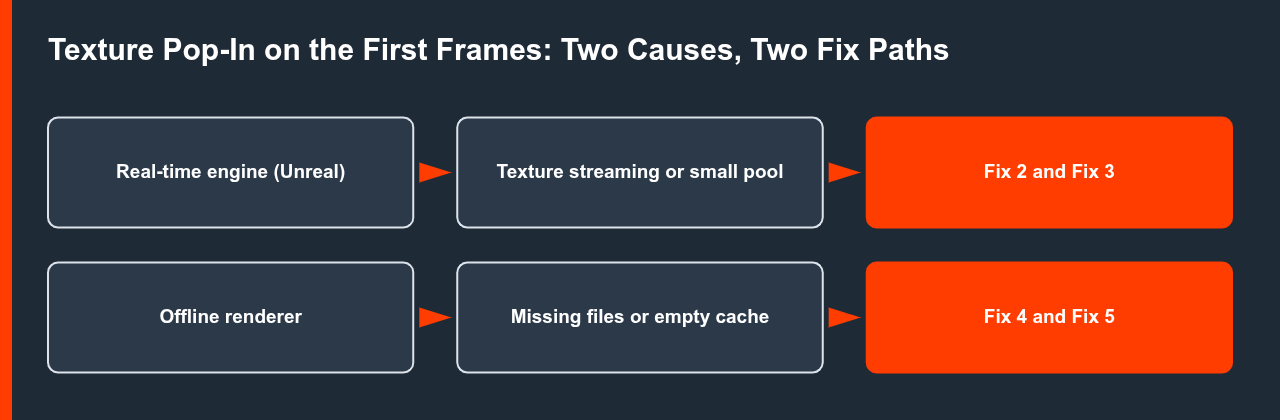
| Symptom | Likely path | What to check | Source |
|---|---|---|---|
| Blurry textures that sharpen in a second or two | Texture streaming (Unreal) | Movie Render Queue override and STAT STREAMING | Epic documentation |
| Some textures never reach full resolution | Streaming pool too small | Required Pool above 100 percent, r.Streaming.PoolSize | Epic metrics page |
| Wrong or missing textures on frame one | Missing files on the render machine | Relative paths, packed assets, missing-file report | Autodesk, Blender manual |
| Slow first frames with large texture uploads | Texture cache too small | Redshift maximum cache size, then percentage | Maxon documentation |
| Slow first frames with JPEG or PNG textures | Textures tiled on demand | Arnold Auto-tile, use tiled MIP-mapped files | Autodesk Arnold guide |
Movie Render Queue Texture Streaming Override: What Each Value Does
Unreal’s Movie Render Queue Game Overrides setting is the first control to try for texture pop-in on the first frames in Unreal. Epic’s Python API notes describe the three values and their VRAM trade-off.

| Value | VRAM need | Documented note |
|---|---|---|
| Don’t Override | Unchanged | Uses the project streaming behavior |
| Fully Load Used Textures | Lower | Can occasionally still result in blurry textures |
| Disable Streaming | Highest | Worth trying if Fully Load Used Textures still gives blurry textures |
STAT STREAMING for pool pressure, then try Disable Streaming only if you have the VRAM.Step-by-Step Check for Texture Pop-In on the First Frames
Run these steps in order on the first ten frames of the sequence. Each step changes one thing, so you can see which setting actually helped.
- Name the engine type. Real-time Unreal points to streaming, while Redshift, Arnold or another offline renderer points to files or cache.
- Look at the symptom. Blurry then sharp is streaming behavior. Wrong or missing textures on frame one is a file problem.
- Unreal: set the override. Choose Fully Load Used Textures in Movie Render Queue Game Overrides and render the first ten frames.
- Unreal: check the pool. Run
STAT STREAMING, and raiser.Streaming.PoolSizeif the Required Pool is above 100 percent. - Offline: confirm every texture is reachable. Use relative paths or packed assets, and run the missing-file report in your application.
- Offline: check the cache. In Redshift raise the maximum cache size first, and in Arnold prefer tiled, MIP-mapped formats such as
.txor.exr.
What We Could Not Verify
We found no official page describing texture pop-in in V-Ray, Cycles or EEVEE, no documentation that Unreal’s warm-up frames fix texture streaming, and no recommended pool size or warm-up count. The Arnold setting name texture_max_memory_MB did not appear on the page we read, so we refer to it as Max Cache Size. Test each change on the first ten frames before you render the whole sequence, since texture pop-in on the first frames shows up there.
Sources
- Epic Games, Texture Streaming in Unreal Engine: dev.epicgames.com (checked 2 November 2026)
- Epic Games, Texture Streaming Configuration: dev.epicgames.com (checked 2 November 2026)
- Epic Games, Texture Streaming Metrics: dev.epicgames.com (checked 2 November 2026)
- Epic Games, Cinematic Rendering Image Quality Settings (Movie Render Queue): dev.epicgames.com (checked 2 November 2026)
- Epic Games, MoviePipelineTextureStreamingMethod (Python API): dev.epicgames.com (checked 2 November 2026)
- Maxon, Redshift Memory (texture cache): help.maxon.net (checked 2 November 2026)
- Autodesk, Arnold User Guide, Textures settings: help.autodesk.com (checked 2 November 2026)
- Autodesk, Arnold for 3ds Max, Textures: help.autodesk.com (checked 2 November 2026)
- Autodesk, Arnold for Cinema 4D, File Paths: help.autodesk.com (checked 2 November 2026)
- Autodesk, Maya 2022 Help, File Path Editor: help.autodesk.com (checked 2 November 2026)
- Blender Manual 2.91, Top Bar (File > External Data): docs.blender.org (checked 2 November 2026; current versions could not be read)
FAQ
Why do I get texture pop-in on the first frames of a Movie Render Queue render?
That behavior matches texture streaming. Epic’s Movie Render Queue offers a Texture Streaming override with Fully Load Used Textures and Disable Streaming, and the pool size can also limit resolution. Test the override first, then check STAT STREAMING.
Do warm-up frames fix texture pop-in on the first frames?
Epic documents Engine Warm Up Count and Render Warm Up Count for particles, cloth, level loading and temporal history. We found no official statement that they fix texture streaming, so test them on your scene.
Why does a render farm show texture pop-in on the first frames?
Our inference is that the render node cannot see the files. Check relative paths, packed assets and missing-file reports, and confirm that every node can reach the same textures.
How big should the Redshift texture cache be?
Maxon gives test values (256 MB for the maximum, then 0.3 to 0.5 for the percentage) rather than a fixed recommendation. It documents a default of 15 percent of free GPU memory with a maximum size, and suggests raising the maximum first when uploads reach hundreds of megabytes or more.
What does r.TextureStreaming do in Unreal?
It switches the texture streamer. Epic’s configuration page says that when it is off, all texture mips are fully loaded, and that this also loads textures that are never rendered. Epic recommends r.Streaming.FullyLoadUsedTextures as the alternative. Because disabling streaming raises VRAM use, try the Fully Load Used Textures override first when you see texture pop-in on the first frames.
Why does the Redshift texture cache start empty?
Maxon documents that the texture cache is empty before any texture data is uploaded, and that the uploaded amount grows as the frame needs data. Redshift gives the cache a share of free GPU memory, 15 percent by default, with a maximum size. If uploads climb into hundreds of megabytes or gigabytes, the cache is probably too small, so raise the maximum size first.
Can Arnold textures cause slow first frames?
Autodesk documents that with Auto-tile, scanline textures such as JPEG are tiled on demand, which adds render time. Arnold for 3ds Max recommends tiled, MIP-mapped formats such as .tx and .exr. This is documented as a render-time cost, not as visible pop-in, so treat it as a possible contributor to slow first frames and test it on your scene.

COMMENTS