
Maxon does not say output differs by machine, so the differences to check are color config, sampling and versions.
Technical Troubleshooting // Redshift Local Versus Farm
A review of Maxon documentation on why a Redshift render looks different on farm nodes than on your own machine, covering color management, sampling settings and GPU memory.
REDSHIFT RENDER LOOKS DIFFERENT ON FARM | OCIO CONFIG | VIEW TRANSFORM | ADAPTIVE ERROR THRESHOLD | TEXTURE CACHE
- Maxon Does Not Say Output Differs by Machine: the differences we can document come from settings, color configs and versions, not from the GPU model.
- Color Config Is a Likely Culprit: Cinema 4D ships with OCIO pre-configured, and one competing farm documents that only the default
ocio.configworks on its Redshift for Cinema 4D 2024 and 2025 nodes. - Sampling Mode Changes Noise: with
Automatic Samplingon, onlyAdaptive Error Thresholdcontrols sample counts, with 0.01 as the default and 0.003 suggested for production. - Texture Cache Scales With the Card: Maxon documents a default of 15 percent of free memory, so a node with a different GPU gets a different cache budget.
- Practical Production Fix: compare config, input color space, sampling and version on one frame. For the full workflow see how to use a render farm for animation.
When a Redshift render looks different on farm nodes than on your workstation, the first instinct is to blame the farm’s GPUs. Maxon’s documentation does not support that explanation. What it does document are settings that can differ between two setups: the OCIO color configuration, the input color space of textures, the sampling mode and the plugin version. This guide walks through each one and says plainly where the documentation stops.
Short answer: compare four things on a single frame, in this order: the color management config and view transform, the texture color spaces and XRefs, the sampling settings, and the Redshift and Cinema 4D versions. Memory settings affect speed and failures more than appearance.
Why a Redshift Render Looks Different on Farm Nodes
There are two kinds of difference, and they have different causes. A look difference, such as shifted color or different grain, points to configuration or version. A behavior difference, such as slow first frames or an out-of-memory failure, points to the hardware budget. We found no Maxon page stating that the same scene renders with different results on different cards, so treat the table as a list of places to compare, not as proven causes.
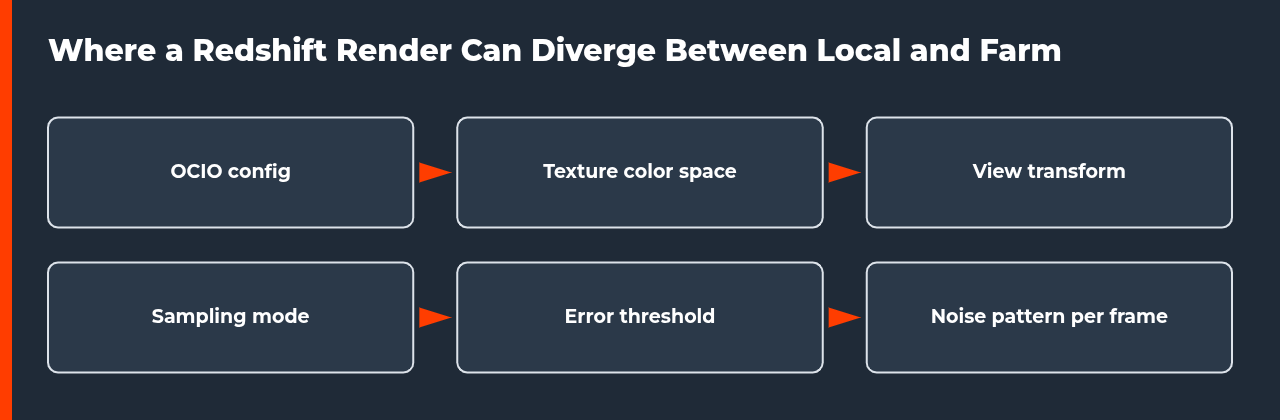
| Area | What to compare | What Maxon documents | Fix |
|---|---|---|---|
| Color config | OCIO config and view transform | Cinema 4D is delivered with OCIO pre-configured; you can use your own configuration | Fix 1 |
| Texture color space | Input color space of each texture | Colors shift when an image is decoded with an unsuitable default space | Fix 2 |
| Sampling | Automatic Sampling, error threshold, min and max samples | Only the Adaptive Error Threshold controls sample counts in Automatic Sampling mode | Fix 3 |
| Version | Redshift and Cinema 4D versions | Automatic Sampling was added in Redshift 3.0.11 | Fix 3 |
| GPU memory | Texture cache budget | The texture cache is 15 percent of free memory by default | Fix 4 |
Fix 1: Compare the OCIO Config and View Transform
Maxon’s OCIO overview says Cinema 4D is delivered with OCIO pre-configured and ready to use, and that you can bring your own configuration. Color management is set in Preferences, and the project settings live under Edit > Project Preferences in the Project and Color Management section. The page does not say what happens when a project is opened on a machine with a different or missing config, so we cannot confirm how a farm handles it.
One competing service documents its own limit, which is useful as a warning even though it describes only that service. Render Network states that custom OCIO configs are not supported for Redshift for Cinema 4D 2023, and that in 2024 and 2025 only the default ocio.config in the Cinema 4D resource folder is used. Our inference is that a project built on a custom config can look different on any node that falls back to the default, so ask your farm which configs it supports.
For the view transform itself, Maxon documents that the Redshift default is the ACES 2.0 SDR video view transform, described as neutral with softer contrast than ACES 1. It also says the view transform can be overridden in the Picture Viewer, the Redshift RenderView and the 3D views, and warns against baking view transforms into saved OpenEXR files. If a Redshift render looks different on farm output only in the saved file, check whether the transform was baked in.
Fix 2: Check Texture Color Space and XRefs
Maxon says it is vital to inform the color space an image is based on. If an image is decoded with an unsuitable default space, colors shift. Radiance .hdr files from the Asset Browser have no color management and are treated as raw, so they are excluded from conversion. Assets that come from outside should be checked against the master project’s color space before you merge them.
XRefs deserve a separate check. Maxon notes that an external scene’s original color management reappears when it is reloaded or updated. A project that looked right on your machine after you adjusted an XRef can change when the farm loads the referenced file fresh. Our suggestion is to open the XRef source on its own and confirm its color setup before you submit.
Fix 3: Compare Sampling Settings and Versions
Redshift’s sampling options decide how much noise remains, so a Redshift render looks different on farm output when the project was sent with a different mode. Table 2 lists the options Maxon documents. Automatic Sampling was added in Redshift 3.0.11, which means a node on an older plugin version would not offer it. Our inference is that you should match the plugin version to your local one, as the farm allows.
| Option | What Maxon documents | Why compare it |
|---|---|---|
| Automatic Sampling | Optional mode that optimizes per-pixel sample counts; only the Adaptive Error Threshold controls sample count | A different mode changes how noise is cleaned |
| Adaptive Error Threshold | Default 0.01; 0.003 recommended for production; lower values shoot more rays | A looser threshold leaves more noise |
| Min and Max Samples | Start at the min count, add rays where noise remains, up to the max; 8 to 16 min with depth of field or motion blur | Low min samples can leave blur grainy |
| Randomize Pattern On Each Frame | Off by default, so the pattern stays consistent per frame and noise can look stuck on the camera | Changes the grain character in animation |
| Automatically reduce samples of other effects | Not recommended by Maxon; divides secondary ray counts by the primary count | Can leave GI and reflections grainier |
Fix 4: Do Not Expect Identical GPU Memory Behavior
Maxon documents that the texture cache gets 15 percent of free memory by default, that Redshift reserves 90 percent of free GPU memory, and that a maximum texture cache size caps the cache on cards with a lot of free memory. The examples in the figure show how the cache scales with the card. The page does not say results differ between cards, so this mainly affects speed and whether a heavy scene fits.
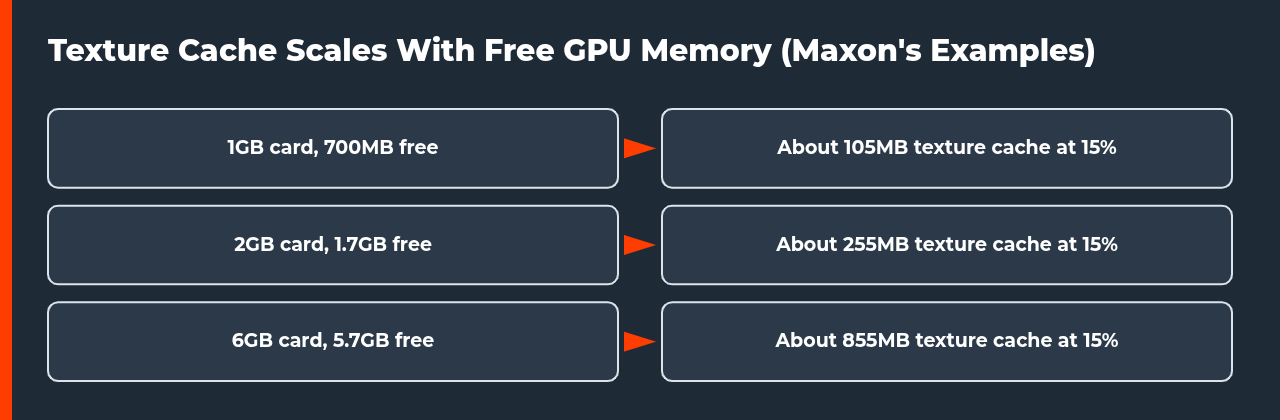
| Card | Free memory | Texture cache |
|---|---|---|
| 1GB | About 700MB | About 105MB |
| 2GB | About 1.7GB | About 255MB |
| 6GB | About 5.7GB | About 855MB |
Step-by-Step: Find Why a Redshift Render Looks Different on Farm Nodes
Work on one frame and change one setting at a time, so you can tell which change mattered.
- Render the same frame twice. Render one frame locally and one on the farm with identical camera and frame number.
- Compare the color config. Check Edit > Project Preferences > Project and Color Management, and ask the farm which OCIO configs it supports.
- Check texture color spaces. Confirm each texture’s input color space, and open any XRef source to check its own setup.
- Compare sampling. Match Automatic Sampling, the Adaptive Error Threshold, min and max samples and the pattern option.
- Match versions. Note your Redshift and Cinema 4D versions and compare them with the farm’s.
- Check the saved file. If only the saved image differs, check whether a view transform was baked in or an EXR was saved unclamped.
For the wider workflow see our guide to using a render farm for animation, and the render farm version compatibility error guide for version mismatches. If you are comparing services for Cinema 4D, see the Cinema 4D cloud rendering guide.
What We Could Not Verify
We found no Maxon page that says a Redshift render looks different on farm hardware for the same scene and settings, and no page describing how a render service handles a missing OCIO config. The Render Network limits describe that service only, and we did not test any farm. We also did not check the Redshift plugins for Maya, 3ds Max or Houdini, whose pages may differ. If your farm output still differs after these checks, send support both frames, your project settings and your software versions.
Sources
- Maxon, Redshift for Cinema 4D, Unified Sampling (checked 9 November 2026)
- Maxon, Cinema 4D Help, OCIO overview (checked 9 November 2026)
- Maxon, Redshift for Cinema 4D, Color Management OCIO and ACES (checked 9 November 2026)
- Maxon, Redshift for Cinema 4D, Memory (checked 9 November 2026)
- Render Network, Using custom OCIO configurations (a render service documenting its own limits) (checked 9 November 2026)
Why does my Redshift render look different on a render farm?
Maxon does not document different output from different machines, so look at settings. Compare the OCIO config and view transform, the input color space of textures and XRefs, the sampling mode and the Redshift version. Render the same frame locally and on the farm, then change one item at a time. A saved file can also differ if a view transform was baked in.
Does a render farm use my custom OCIO config?
That depends on the farm. Maxon’s page does not cover rendering on another machine. Render Network documents that its Redshift for Cinema 4D nodes do not support custom configs in 2023 and use only the default ocio.config in 2024 and 2025. That describes one service, so ask your own farm which configs it supports.
What Adaptive Error Threshold should I use in Redshift?
Maxon documents a default of 0.01, which it says should work well for a variety of scenes, and recommends lower settings such as 0.003 for production quality. Lower values detect noise more aggressively and shoot more rays per pixel. In Automatic Sampling mode this threshold is the only control that affects sample counts, so match it on the farm.
Why does my Redshift noise look stuck in animation?
Maxon says the sampling pattern stays consistent per frame by default, so noise can appear stuck on the camera during animation. Enabling Randomize Pattern On Each Frame randomizes the pattern on each frame and gives a moving, film-grain look. Check that this option matches on the farm, since a different value changes how the grain moves.
Does the GPU in a farm node change how my render looks?
We found no Maxon statement that it does. The documented effect is on memory. Redshift gives the texture cache 15 percent of free memory by default, so a card with more free memory gets a larger cache. Maxon describes this as a performance and fit matter, so check color and sampling before you blame the hardware.
Can an XRef make my farm render look different?
It can. Maxon notes that an external scene’s original color management reappears when it is reloaded or updated. If a farm loads the referenced file fresh, it may use that original setup instead of the adjusted one on your machine. Open the XRef source on its own and confirm its color setup before you submit the job.
Should I bake the view transform into an EXR?
Maxon warns against baking view transforms into saved OpenEXR files, and for compositing it recommends an unclamped linear EXR without the view transform. Baking is expected for LDR outputs such as JPG and PNG. If only the saved image differs from what you saw on screen, check which of the two you used.

COMMENTS