
Flickering shadows and lights in animation usually come from four causes. Learn how to isolate each one and fix it with a seven-step check.
Quick answer
Flickering shadows and lights in animation usually trace back to four causes: too few light samples, a noise pattern that does not change in a controlled way, unevenly animated lights, or cached lighting data that differs from frame to frame. Isolating which one changes between two frames points straight to the fix.
FLICKERING SHADOWS AND LIGHTS IN ANIMATION | LIGHT SAMPLES | ANIMATED SEED | LIGHT KEYFRAMES | GI CACHE
- Compare two frames: flicker is a difference between frames, not a defect inside one.
- Raise light samples: shadow noise comes from too few light samples, and large lights need more.
- Animate the seed: the Blender manual recommends it for animations.
- Smooth light keys: uneven keyframes and expressions flicker by design.
- Lock cached data: keep cache files and settings identical across the sequence.
The still frame looks fine. Played back at 24 fps, the shadows crawl and a lamp seems to breathe. This is the pattern behind flickering shadows and lights in animation, and it is easy to misdiagnose because you cannot see it in any single frame. You have to compare frames.
This article focuses only on light and shadow causes, and stays independent of one render engine. For general flicker across a whole animation, see the render noise and flicker guide. For Cycles noise patterns see Cycles temporal flicker noise, and for brightness jumping between cuts see inconsistent brightness between shots.
Why flickering shadows and lights in animation happen
A path tracer estimates light by random sampling. Each frame is a fresh estimate, so a frame with few samples contains an error, and the error is slightly different in the next frame. In a still image that error is grain. In motion it is flicker. Shadows are where this shows first, because a soft shadow from a large light is the result of many random light samples falling on or off the surface.
Autodesk’s Arnold guidance states that direct diffuse (shadow) noise calls for more light samples, that larger lights make softer shadows that need more samples to resolve, and that noise nearly always comes from insufficient sampling. See the Arnold removing noise tutorial. The same logic applies to other path tracers, although setting names differ.

| What you see | Likely cause | First test |
|---|---|---|
| Shadow edges crawl | Too few light samples | Raise light samples, compare two frames |
| Grain pattern jumps | Seed or sampling pattern behaviour | Switch animated seed on or off |
| Light pulses in brightness | Uneven keyframes or expression | Freeze the light and render two frames |
| Lighting shifts in patches | Cached lighting differs per frame | Reuse one cache across the sequence |
| Fireflies in some frames | Bright samples from small or strong lights | Enlarge the light or lower intensity |
This table is a diagnostic map built from the sources cited here and general rendering practice. It is not a measurement. Confirm the cause on your own scene before changing settings, because several causes can appear together.
Step by step: isolate the cause
Work from cheapest test to most expensive. Each step changes one thing, so a result tells you something.
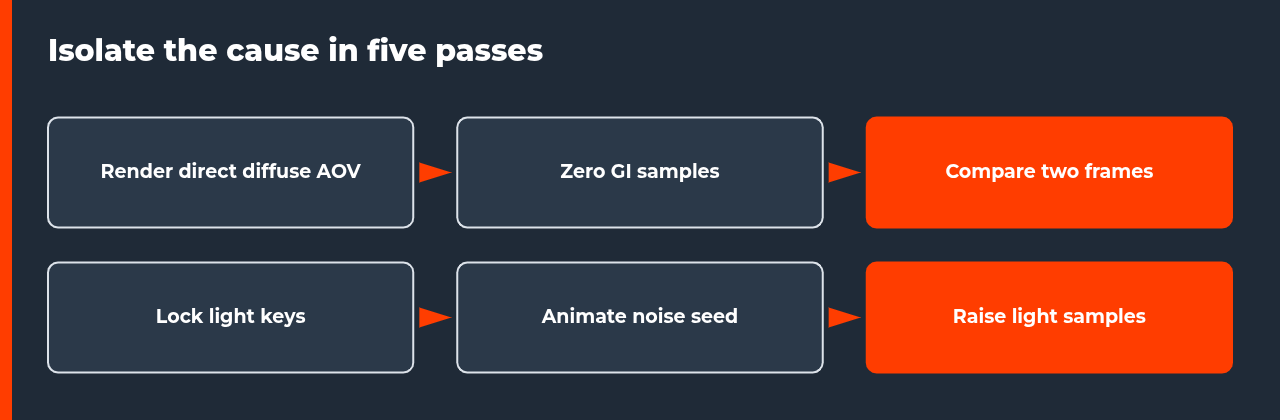
- Pick two bad frames. Choose neighbouring frames where the flicker is visible, and render them at your final settings.
- Freeze the lights. Remove animation from every light and render the same two frames. If flicker stops, the cause is light animation.
- Check the animation curves. Look for spikes, stepped keys and expressions. Switch to smooth interpolation.
- Render a direct-lighting pass. Use a direct diffuse output, or set indirect samples to zero, to separate shadow noise from global illumination noise.
- Raise light samples. Increase them in small steps and compare the same two frames after each change.
- Set the seed deliberately. In Cycles, enable Use Animated Seed. In other engines, find the equivalent per-frame noise setting.
- Fix cached data. If your engine uses a lighting cache, compute it once and reuse the same file across the sequence.
Sampling and seed settings that affect shadow flicker
Two documented settings matter most. The first is the number of light samples. Arnold’s guidance gives 3 to 4 light samples as sufficient for most scenes, with more for large lights, and recommends confirming the noise source by setting the matching sample count to 0 and checking whether the noise disappears. The second is the seed. The Blender Cycles sampling manual says Use Animated Seed changes the seed for each frame, and recommends it for animations because a changing noise pattern is less noticeable than a fixed one.
| Setting | What the documentation says | What to check |
|---|---|---|
| Light samples (Arnold) | Shadow noise calls for more light samples; 3 to 4 enough for most scenes | Raise for large, soft lights |
| Use Animated Seed (Cycles) | Changes the seed per frame; recommended for animations | Compare animated and fixed seed on two frames |
| Noise Threshold (Cycles) | Adaptive sampling stops clean pixels; typical values 0.1 to 0.001 | Use one value for the whole sequence |
| Light Tree (Cycles) | Samples lights by distance and intensity; can reduce noise | Test on scenes with many lights |
| Light Threshold (Cycles) | Terminates light samples below a contribution threshold | Keep it identical across frames |
Light animation that flickers by design
Not every flicker is a render error. A light with stepped keyframes jumps in brightness exactly where the keys are. A light driven by an expression or noise modifier changes every frame on purpose. Sun and sky setups that animate time of day can also change shadow direction and softness faster than intended. If freezing the light removes the flicker, the render is behaving correctly and the fix is in the animation curve.
Check the curve editor for single-frame spikes, which often come from a stray key or an imported animation with sampling noise. Replace stepped interpolation with smooth interpolation, then render two frames on either side of the old spike to confirm. If the flicker came from a hand-keyed lamp, adjust the curve; if it came from imported motion data, filter or resample the curve before rendering.
Cached lighting data and consistency across frames
Some engines store computed lighting in a cache and reuse it. If each frame recomputes its own cache, small differences show up as shifting patches of light on walls and under objects. If a cache is shared incorrectly, the opposite problem appears: lighting that does not follow moving objects. Engine documentation describes cache modes for animation, so read the section for your renderer. For V-Ray specifically, a dedicated article on render noise and flicker covers the general workflow, and a V-Ray specific guide follows on this site.
Whatever the engine, keep one rule: every frame of a sequence must use the same cache file or the same cache settings, and that must also hold when frames are split across several machines. Test the first, middle and last frame before the full job. A frame that looks right alone can still differ from its neighbours.
When a denoiser helps and when it hides the cause
A denoiser can make shadow noise less visible, but it works on each frame separately unless the tool supports temporal denoising. The result can be smooth stills with small differences between frames. Use the denoiser last. First get sampling and seed behaviour stable with the denoiser off on two test frames, then enable it and check again. If the flicker returns only with the denoiser on, read denoiser losing detail in animation for the trade-offs.
FAQ: flickering shadows and lights in animation
What causes flickering shadows and lights in animation?
Most cases come from one of four sources: too few light samples that make shadow noise differ per frame, a noise pattern that changes unpredictably, light values that are animated unevenly, or cached lighting data that is recalculated differently each frame. Render a direct-lighting pass, compare two neighbouring frames and see which of the four changes before you touch any setting.
Is flicker in shadows the same as noise?
Not exactly. Noise is the grain inside one frame. Flicker is the change in that grain, or in brightness, between frames. A frame can look clean on its own and still flicker in sequence. Shadow noise is a common trigger because soft shadows from large lights need many samples to resolve, and low counts make each frame resolve them slightly differently.
Should I use a fixed or animated seed to stop shadow flicker?
The Blender manual recommends enabling Use Animated Seed for animations, because a noise pattern that changes each frame is less noticeable than a fixed one. A fixed seed repeats the same pattern, which can look like dirt on the lens. Neither choice removes noise, so still raise samples until the remaining grain is acceptable in motion.
How many light samples do I need to stop flickering shadows?
There is no single number. Autodesk’s Arnold guidance says light samples between 3 and 4 are enough for most scenes, and that larger lights need more because their shadows are softer. Treat that as a starting point, then test a short range of frames and increase only if shadow noise still changes between frames.
Can animated light intensity cause flicker even with enough samples?
Yes. If a light is keyframed with uneven values, or driven by an expression or a noise modifier, the brightness changes between frames by design. This is not a render problem. Check the animation curve for spikes or stepped keys, set a smooth interpolation and render two frames with the light frozen to confirm the cause.
Does a denoiser fix flickering shadows?
It can reduce grain but may also add its own frame-to-frame variation, because each frame is denoised separately. If the shadows still change after denoising, the cause is usually in sampling or the lighting data, not the denoiser. Test with the denoiser off on two frames first so you know what you are fixing.
Will a render farm change how my shadows flicker?
A farm does not create flicker by itself, but it can expose it. Frames are rendered on separate machines, so any setting that depends on a per-machine or per-session cache can differ between frames. Keep seeds, cache files and light settings identical across the whole sequence, and test the first, middle and last frame before the full job.

COMMENTS