
Discover the top 3 beginner-friendly 3D modeling software and learn which tools offer the best balance of ease of use, accessibility, and long-term growth potential.
Choosing the right 3D modeling software is often the first major challenge beginners face. With so many tools available, each offering different features, workflows, and learning curves, so it’s easy to feel overwhelmed before even creating the first model. From my experience, starting with software that doesn’t match your skill level can slow down progress and reduce motivation. That’s why this article focuses on the top 3 modeling software for beginners, selected based on practical criteria such as ease of learning, community support, accessibility, and long-term growth potential.
Criteria for choosing beginner-friendly modeling software
Before recommending any software, I think it’s important to clarify what actually makes a 3D modeling program suitable for beginners. Below are the things you need to consider.
The first factor is ease of learning and workflow clarity. Beginners need tools that feel logical and approachable, allowing them to understand basic modeling concepts without being overwhelmed by complex interfaces or technical settings.
The second factor is community support and learning resources. A strong user community, along with tutorials, documentation, and forums, plays a huge role in helping beginners solve problems and stay motivated when they get stuck.
Cost and accessibility also matter, especially for students or self-learners. Usually software that is free, affordable, or offers flexible licensing makes it easier to practice consistently without financial pressure.
Finally, look at long-term growth potential. Beginner-friendly software shouldn’t become obsolete once basic skills are learned. The best tools allow users to grow gradually, moving from simple modeling to more advanced workflows without needing to switch software too early.
Top 3 modeling software for beginners
Below are top 3 modeling software I think newbies can get started with:
Blender
Ease of learning & workflow clarity
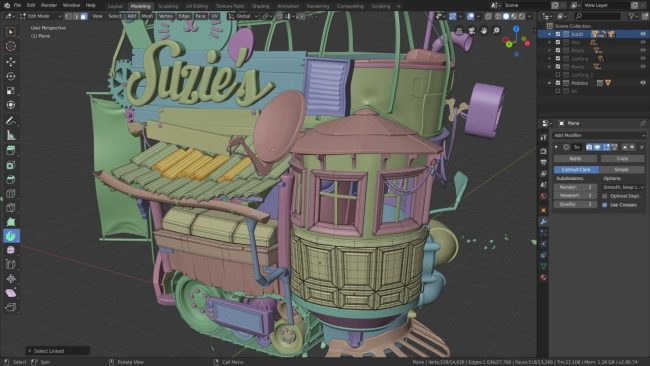
Blender offers a powerful modeling toolset, but its learning curve can feel steep at the beginning. The interface may appear complex to new users; however, once basic navigation and core modeling tools are understood, the workflow becomes more manageable.
Community & learning resources
Blender has one of the largest and most active 3D communities. Beginners can easily find tutorials, documentation, and troubleshooting support, which significantly helps reduce learning difficulties during the early stages.
Cost & accessibility
As a free and open-source software, Blender is highly accessible for beginners. There are no licensing costs or usage limitations, making it suitable for students and self-learners.
Room to grow
Blender supports a wide range of workflows beyond basic modeling, allowing beginners to progress into more advanced areas without switching software too early.
In short: Blender is well-suited for beginners who are willing to invest time in learning and want a free software with strong long-term potential.
Cinema 4D
Ease of learning & workflow clarity
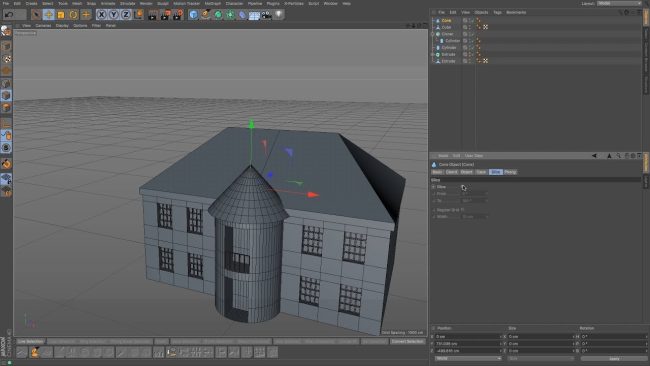
Cinema 4D is widely regarded as one of the most beginner-friendly professional 3D software. Its interface is clean, well-organized, and easy to navigate, allowing beginners to understand basic modeling workflows relatively quickly without being overwhelmed.
Community & learning resources
Cinema 4D has a strong learning ecosystem, especially in motion design and product visualization. There are many beginner-focused tutorials, official documentation, and training materials that help new users build a solid foundation.
Cost & accessibility
Cinema 4D is a paid software, which can be a barrier for some beginners. However, educational licenses and trial versions make it accessible for students or those who want to evaluate the software before committing.
Room to grow
Cinema 4D offers a smooth learning path from basic modeling to more advanced workflows. Beginners can continue developing their skills within the same software without needing to switch tools early.
In short: Cinema 4D is well-suited for beginners who prioritize ease of use and a clear workflow, especially those interested in motion graphics or design-oriented 3D work.
SketchUp

Ease of learning & workflow clarity
SketchUp is widely known for its simple and intuitive modeling approach. The toolset is easy to understand, making it possible for beginners to start creating basic 3D models with minimal training. The workflow focuses on direct manipulation rather than complex settings.
Community & learning resources
SketchUp has a solid user base, especially in architecture and interior design. There are many beginner tutorials and practical examples available, which help new users grasp basic 3D concepts quickly.
Cost & accessibility
SketchUp offers both free and paid versions. The free web-based version is accessible for beginners who want to learn basic modeling without upfront costs, while paid versions provide more advanced features.
Room to grow
SketchUp is suitable for learning fundamental 3D modeling and spatial thinking. However, it is more limited when moving toward complex geometry, animation, or high-end rendering, which may require transitioning to other software later.
In short: SketchUp is best suited for absolute beginners who want the easiest entry into 3D modeling, particularly for architectural or conceptual work.
Final thoughts
For beginners, choosing the right 3D modeling software is less about finding the most powerful tool and more about finding one that supports learning effectively. Blender, Cinema 4D and SketchUp each serve different learning needs, from flexibility and long-term growth to ease of use and quick entry into 3D modeling. The best starting point ultimately depends on learning goals, budget, and preferred workflow, but starting with a tool that feels approachable will always make the learning journey smoother and more sustainable.
Read more about my article: Here

COMMENTS