
A practical guide outlines the key factors to consider when choosing the best render farm for your projects.
When scenes become heavier, resolutions increase and clients demand faster delivery, relying on a single local machine often leads to wasted hours, rising stress and compromised output quality. This is exactly why many artists and studios and even me choose to outsource rendering to render farm solutions. Performance, pricing models, software support, scalability, and reliability,… all play a critical role when finding a render farm, but among a lot of render farms out there, do you know which one is the best choice for your projects? Understanding this, today, I want to share my experience (which I’ve gained over the past years) on choosing a best render farm and I hope that it will be helpful for you.
What Is A Render Farm And When Do You Need One?
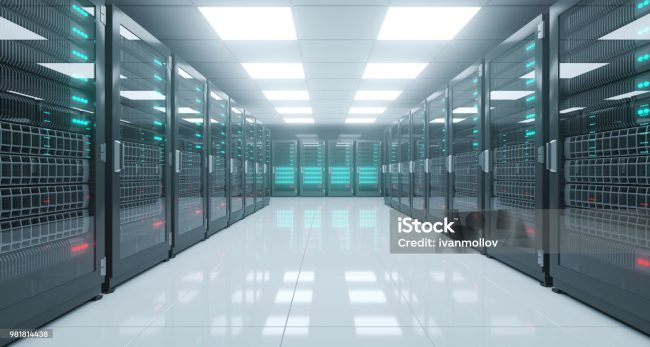
A render farm is a collection of high-performance computers, either on-premises or cloud-based, designed to process rendering tasks in parallel. Instead of relying on a single local machine to calculate every frame or image, a render farm distributes the workload across multiple powerful nodes, significantly reducing render times and improving overall efficiency.
You typically need a render farm when your project goes beyond what your workstation can handle efficiently. Common signs include render times stretching into hours or even days, frequent crashes caused by memory limitations, or deadlines that leave no room for slow iteration. A render farm becomes especially valuable when scalability is critical, such as rendering hundreds or thousands of frames for animation, producing multiple outputs simultaneously, or managing last-minute client revisions. Therefore, choosing the best render farm can help your projects be delivered on time.
Key Criteria For Choosing The Best Render Farm
1. Hardware performance (GPU, CPU, VRAM)
Hardware performance is one of the most critical factors when evaluating any render farm. Rendering workloads are extremely demanding, and the quality, speed and stability of the hardware directly affect how efficiently your project can be completed. A render farm equipped with modern, high-performance GPUs can dramatically reduce render times, especially for complex scenes and high-resolution outputs.
VRAM plays an equally important role. Insufficient VRAM often leads to crashes, failed renders, or the need to simplify scenes, which can compromise visual quality. A reliable render farm should offer GPUs with ample VRAM to handle large textures, detailed geometry, and memory-intensive workloads without constant optimization on your end.
Another aspect to consider is whether the render farm supports multi-GPU or not. The ability to scale across multiple GPUs allows rendering tasks to be processed in parallel, significantly improving performance for animations and large batches of frames.
2. Software and renderer support
Software compatibility is another essential criterion when selecting the best render farm. A service may offer powerful hardware, but if it does not fully support the software and versions used in your project, you can’t render anything. A reliable render farm should support a wide range of industry-standard 3D applications, such as Cinema 4D, Maya, Blender, Lumion, Twinmotion, Enscape, D5 Render,… with multiple software versions to accommodate different production pipelines.
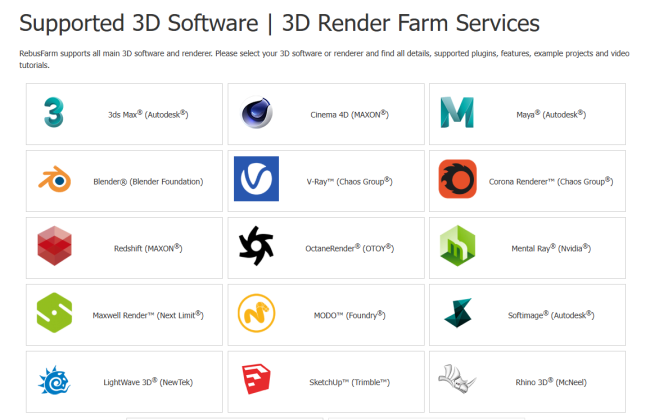
Beyond core software support, it is equally important to consider whether the render farm handles plugins, textures, and external assets correctly. Missing plugins or unsupported assets can result in broken scenes, incorrect materials, or failed renders, leading to wasted time and repeated uploads. The ability to manage complex asset dependencies smoothly is a strong indicator of a mature and well-optimized service.
Version mismatch is one of the most common causes of rendering problems on render farms. Differences in software builds, renderer versions, or plugin updates can produce unexpected errors or visual inconsistencies compared to local renders.
3. Rendering speed and scalability
Rendering speed is another primary reason when you choose the best render farm. Compared to local machines, a render farm can significantly shorten render times by distributing workloads across multiple high-performance nodes/machines. The actual speed improvement depends on the complexity of the scene and the number of available resources, but for large projects, the difference can mean finishing in hours instead of days.
Scalability becomes especially important when deadlines are tight. A reliable render farm can allow users to quickly scale up resources when urgent renders are required, rather than being limited to a fixed amount of hardware. This flexibility is crucial for handling peak workloads, last-minute revisions, or large animation sequences that need to be delivered within a short timeframe.
Another key factor is the ability to run multiple jobs in parallel. Instead of rendering tasks sequentially on a single machine, a scalable render farm can process several jobs at the same time, improving overall productivity. For animation projects, frame-by-frame rendering across multiple nodes enables faster turnaround without compromising consistency.
4. Ease of use and workflow integration
Ease of use plays a major role in determining whether a render farm truly improves your workflow or becomes an additional source of friction. A well-designed render farm should minimize technical barriers, allowing users to get started quickly without spending excessive time learning new systems.
Besides, you also need to pay attention to file management. Uploading and downloading project files should be straightforward, reliable and efficient, especially when dealing with large assets or multiple revisions. Slow transfers, unclear folder structures, or frequent upload errors can significantly disrupt production and reduce the overall benefits of using a render farm.
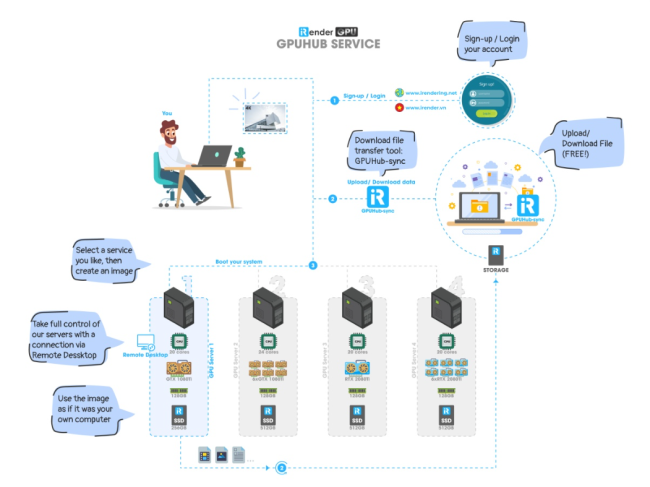
Workflow flexibility also matters. Some render farms rely solely on job submission systems, while others offer remote desktop access that allows users to access and work directly on high-performance machines as if they were local workstations. Each approach serves different needs, but choosing the best render farm means selecting a solution that aligns with your working style.
5. Pricing model and cost transparency
Pricing is a critical factor when choosing the best render farm for your projects as different services apply different billing models. Some charge based on usage time, others on GPU hours or computing nodes, and each model can affect overall costs depending on the size and duration of your project.
Cost transparency is equally important. A reliable render farm should clearly explain what is included in its pricing and whether additional fees apply for data storage, file transfers, or premium support. Hidden costs can quickly make an initially affordable service far more expensive than anticipated, especially for large or long-running projects.
Finally, it is worth comparing render farm costs with the expense of upgrading local hardware. In my opinion, for short-term or occasional projects, renting a render farm is often more cost-effective than investing in new equipment. However, for long-term, high-volume workloads, the balance may differ.
6. Stability, security, and data safety
Stability is a critical factor when using a render farm, especially for complex or long-running projects. Frequent crashes, interrupted renders, or unstable nodes can lead to lost time and repeated work. A reliable render farm should provide a stable environment that allows rendering jobs to run consistently without unexpected failures.

Data security is very important, particularly when working on commercial projects or client-sensitive content. Users should understand how project files are stored, who can access them, and what security measures are in place to protect data during upload, rendering, and download.
Another key consideration is whether project files are automatically removed after rendering is complete. For many studios and professional clients, data retention and deletion policies are essential for compliance and confidentiality.
7. Technical support and customer service
Technical support can make a significant difference when problems arise during rendering. Even with a stable setup, issues such as failed jobs, software errors, or configuration problems can occur, and timely assistance is essential to keep production on track. A reliable render farm should provide support when rendering issues happen, rather than leaving users to troubleshoot on their own.
Response time is a critical factor when referring to customer service. Slow or delayed replies can turn minor technical issues into major production delays. For professional users, availability outside standard business hours can be especially valuable, as rendering often happens overnight or across different time zones. Strong technical support and customer service help ensure a smoother and more predictable rendering experience.
Comparing Some Outstanding Render Farms
In this blog, I will compare 5 outstanding render farms based on the criteria above: iRender, Rebusfarm, GarageFarm, RANCH Computing and Fox Renderfarm.
| iRender | RebusFarm | GarageFarm | RANCH Computing | Fox Renderfarm | |
| Hardware performance (GPU, CPU, VRAM) | GPU RTX 4090, CPU AMD Ryzen Threadripper Pro 3955WX @ 3.90GHz – 4.2GHz and AMD Ryzen™ Threadripper™ PRO 5975WX @ 3.6 – 4.5GHz, RAM 256GB, vRAM 24GB and 2TB SSD NVMe Storage | Various | Various | Various | Various |
| Software and renderer support | All software and engines/plugins | Major 3D software and engines/plugins: 3ds Max, Maya, V-Ray, Cinema 4D, Blender, Corona, Rhino, Octane, Redshift, etc. | Blender, Maya, 3ds Max, Cinema 4D, Houdini, along with major render engines such as Cycles, V-Ray, Arnold, Redshift, Corona, Octane, etc. | Major 3D software and engines/plugins: 3ds Max, Maya, V-Ray, Cinema 4D, Blender, Corona, Rhino, Octane, Redshift, etc. | Blender, Maya, 3ds Max, Cinema 4D, Houdini, with major engines such as Cycles, V-Ray, Arnold, Redshift, Octane, etc. |
| Rendering speed and scalability | IaaS model, Flexible scalability for large projects and tight deadlines | SaaS model | SaaS model | SaaS model | SaaS model |
| Ease of use and workflow integration | All-in functions in the iRender GPU App | Render jobs are submitted via the RebusDrop plugin on supported 3D software | Render jobs are submitted directly from 3D software via official plugins | Render jobs are submitted via the RebusDrop plugin on supported 3D software | Render jobs are submitted through the platform or official plugins |
| Pricing model and cost transparency | $8.2 – $52 per node per hour, pay for the time remote servers run | Usage-based pricing based on actual render time and render type (CPU/GPU) | Credit-based, varies by actual render time, software, render engine and render type (CPU/GPU) | Usage-based pricing based on actual render time and render type (CPU/GPU) | Point-based, usage-based pricing depending on actual render time and render mode (CPU/GPU) |
| Stability, security, and data safety | Provides non-disclosure agreement (NDA), ISO27001 Certification, Data center has a Tier III Certificate – Data Center 99.99% Uptime SLA | Provides non-disclosure agreement (NDA) | Provides non-disclosure agreement (NDA), ISO27001 Certification by its sister company | Provides non-disclosure agreement (NDA), TPN Gold Shield Certification | Provides non-disclosure agreement (NDA), ISO27001 Certification, TPN-Accredited Vendor |
| Technical support and customer service | Assistant support 24/7 via Live chat, WhatsApp, Email, KakaoTalk | Assistant support 24/7 via Phone number, Live chat, Email | Assistant support 24/7 via Live chat, Email, divided into Limited/Medium/Premium lever support based on price | Monday to Friday from 9 am to 7 pm(UTC +1 / Paris, France) via Phone number, Email, Skype | Assistant support 24/7 via Live chat, WhatsApp, Email |
Conclusion
Choosing the best render farm for your projects is very important when your deadlines are coming. You need to consider whether a render farm truly fits your project’s technical requirements, budget, and workflow. Factors such as hardware performance, software compatibility, ease of use, scalability, pricing transparency, stability, and customer support all play a role in determining whether a render farm will help you meet deadlines or introduce new challenges.
Hope that my experience can help you choose a suitable render farm for your projects!

COMMENTS